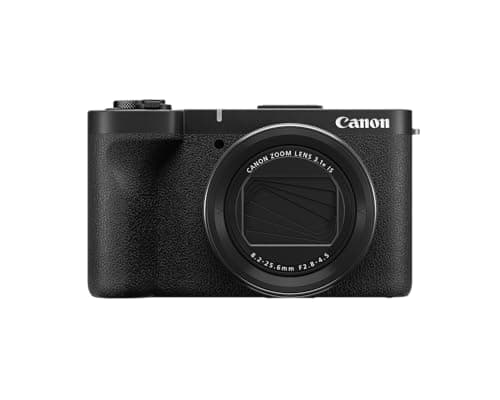
The Canon PowerShot V1 is the fixed-lens camera to buy if you want a real step up from a phone or a 1-inch compact and you would rather not manage lenses. Its 1.4-inch sensor is the largest in this class, its 16-50mm-equivalent zoom starts wider than any rival, it has a built-in 3-stop ND filter, and a cooling fan means 4K30 records until the card is full. The catches are just as concrete: it weighs 426g and will not fit a pocket, 4K60 comes with a 1.4x crop and loses the best stabilization modes, and it is a video camera first and a stills camera second.
The usual disclosure: we have not put a V1 through a lab. This review is compiled from Canon's published specification sheet and the documented findings of reviewers who shot with one — named and linked in Sources — then scored against our rubric. Informed judgment from research, not bench measurements. Any price on this page comes from the live price check, never from memory.
Who it's for
The V1 is for the creator who has outgrown a phone but does not want an interchangeable-lens system. That is a real and specific person: someone filming talking-head videos, travel vlogs, product demos or tutorials who wants better low-light footage and real background blur, but who knows they will never buy a second lens. For them the V1 packages the useful parts of a small mirrorless camera — a larger sensor, Canon's Dual Pixel autofocus, a mic input, a headphone jack and a hot shoe — into one object with nothing to swap.
It also suits anyone who films in bright sun. The built-in ND filter is the feature people underrate until they own one: it lets you hold a natural, motion-blurred shutter speed outdoors without screwing a filter onto the front, which on a compact you usually cannot do anyway. Our ND filter guide explains why that matters for video; the V1 simply builds the answer in.
Who should look past it? Anyone who values pocketability above image quality — the DJI Osmo Pocket 3and the Sony ZV-1F are far smaller — and anyone who mostly shoots stills. Reviewers who tried the V1 as a photography camera found the small, clickless controls and the shallow grip work against it; DPReview's verdict was that it "works less well" for photos despite the appealing ultra-wide lens. If stills are half your output, a body from our best mirrorless cameras for beginners with a kit zoom is the better tool.
Where it's strong
A 1.4-inch sensor, which changes what a compact can do
Canon lists the sensor as a 1.4-type CMOS with 22.3 effective megapixels for stills and 18.7 for video, paired with its DIGIC X processor. DPReview measured the active area at roughly 18.4 x 12.3mm, which is close to twice the area of the 1-inch chips in the Sony ZV-1 II and ZV-1F. That is the whole reason the V1 exists. More sensor area means less noise when the light drops, more dynamic range to recover in editing, and a more noticeable background blur at the same aperture. Photography Blog's side-by-side found noise comparable to the older G7 X Mark III despite the V1's slower lens, which is the sensor doing exactly what it should. It is still smaller than the APS-C sensor in a Sony ZV-E10 or Canon R50; see our crop factor explainer for what each size actually buys you.
The widest zoom in the category
The built-in lens is an 8.2-25.6mm f/2.8-4.5, which Canon quotes as 16-50mm equivalent for stills and 17-52mm for video. Sixteen millimeters is genuinely ultra-wide: wide enough for arm's-length selfie framing with your surroundings in shot, wide enough for a cramped desk setup or a small kitchen, and wider than the 18mm the ZV-1 II starts at. The long end gives you a normal-perspective talking head. Canon also lists a 5cm closest focus at the wide end, so product close-ups work without accessories, and the "Movie for Close-Up Demos" mode shifts focus from your face to whatever you hold up automatically. The trade is the aperture: f/2.8 at the wide end falls to f/4.5 zoomed in, slower than the f/1.8-2.8 lenses on older 1-inch compacts. The bigger sensor claws most of that back.
The ND filter and the fan: the two features that make it a working tool
A built-in 3-stop ND filter, switchable to auto in video, is a feature usually reserved for camcorders and cinema cameras. It lets you hold a slower, natural-motion shutter speed and a wider aperture outdoors than the light would otherwise allow, instead of stopping down or cranking the shutter. The cooling fan is the other grown-up touch: Canon says it adjusts speed with temperature, and Photography Blog lists unlimited 4K30 recording — no 30-minute cap, no thermal shutdown mid-interview. For anyone livestreaming or recording long sit-down pieces, that alone rules out several cheaper rivals.
Oversampled 4K30, 10-bit Canon Log 3 and real audio connections
The 4K24/25/30 modes use the full sensor width, oversampled from 5.7K, which is how the V1 gets footage that looks sharper than its resolution. Canon Log 3 in 10-bit is available for anyone who grades, and DPReview quotes an average bitrate around 230 Mbps in the top modes — plan for a fast card; our SD card speed classes guide covers what that means in practice, and the slot takes UHS-II. Audio is handled properly: a three-capsule internal mic array with a windscreen in the box, a 3.5mm mic input, a 3.5mm headphone jack for monitoring, and Canon's multi-function shoe for a digital mic. Most compacts give you one of those; the V1 gives you all four.
Autofocus that tracks people and pets
Dual Pixel CMOS AF II covers roughly 90 percent of the frame and detects human and animal eyes in every AF mode, per Canon's spec sheet. Photography Blog found it focused "much more quickly and confidently" than the G7 X III in good light or bad. For a solo creator that translates to the practical thing you want: you can walk into frame and the camera finds your eye without a tap.
Streaming without drivers
Plug the V1 into a computer over USB-C and it works as a Full HD 30fps webcam with no software, and it can livestream to YouTube or Facebook over Wi-Fi through Canon's app with no computer at all. There is a dedicated livestream button on the body. The camera also charges and runs from USB-C power, so a desk streamer never touches the battery. If streaming is your main use, compare it against our best cameras for streaming before committing, because a cheaper body with a clean HDMI feed may serve just as well.
The honest catches
It is not a pocket camera
Canon lists 426g with battery and card and 118.3 x 68.0 x 52.5mm. That is roughly 120g heavier than the G7 X III it replaces and well above the Sony pocket compacts. It goes in a jacket pocket at a stretch and in any bag easily, but the throw-it-in-your-jeans convenience that defines the compact category is gone. If that convenience is the reason you are shopping for a compact rather than a mirrorless body, the V1 has quietly stopped being the right answer, and our best compact vlogging cameras ranking places it accordingly.
4K60 is a compromise mode
Canon's own materials call 4K60 "cropped"; DPReview puts the factor at 1.43x and Photography Blog at 1.4x. Either way your 17mm wide end becomes roughly 24mm, the oversampling advantage disappears, and Canon's spec notes that Subject Tracking IS is unavailable at 4K60. Treat 4K60 as an occasional slow-motion tool, not the mode you leave the camera in. Full HD reaches 120fps, but Digital Camera World called the 1080p120 footage "mushy."
Rolling shutter is on the high side
DPReview measured roughly 26ms of rolling shutter in 4K30. That is slow enough that fast pans and passing traffic will show visible skew. It is not unusual for a camera at this price, and for a talking head it never matters, but if your videos involve whip pans or filming from a moving vehicle, this is a known weakness. The 4K60 crop mode reads out faster at about 16ms, which is one legitimate reason to switch to it.
No in-body stabilization
Stabilization comes from the lens's optical IS and from Movie Digital IS, which crops the frame in its Enhanced mode. DPReview found the combination effective, and Canon's Subject Tracking IS — which shifts the crop to keep you centered — is a clever addition. But there is no sensor-shift IBIS, and the digital modes cost you field of view. For genuine walking footage the Osmo Pocket 3's mechanical gimbal is in a different league, and our stabilization explainer spells out why.
The controls were designed for filming yourself
Every reviewer we read flagged the ergonomics for stills. The front dial is clickless, the rear wheel is thin, the grip is shallow so that it balances when the screen faces you, and there is no viewfinder and no way to add one. Canon also dropped the exposure compensation dial the G7 X III had. None of this matters when the camera is on a grip pointed at your face. All of it matters if you were hoping for a pocket photography camera with an ultra-wide lens. Photography Blog also noted vignetting and distortion in the RAW files that JPEGs correct automatically — fine for video, a small chore for anyone editing stills.
Battery is average and the app requires an account
The V1 uses Canon's LP-E17, the same battery as the R50 and R10. DPReview lists a CIPA rating of 340 shots, or 400 in power-saving mode; Photography Blog quotes about 70 minutes of video per charge. That is a normal figure for the class, and USB-C power delivery means a power bank keeps a long session going. The spare batteries are cheap and common, which is a genuine advantage over compacts with proprietary cells. Less welcome: the Canon Camera Connect app requires a Canon account login before it will pair.
Canon PowerShot V1 vs the alternatives
vs Sony ZV-1 II
The Sony is the direct rival and the smaller, lighter camera. The V1 counters with the larger sensor, the wider lens, optical stabilization the Sony lacks, a 4K60 option the Sony does not have, a headphone jack and a hot shoe. Sony keeps the edge on size and, in DPReview's judgment, on autofocus and on its product-showcase mode. Digital Camera World went as far as saying the V1 is "going to eat the Sony ZV-1 II's lunch." Our view is narrower: if you can carry the extra weight, the V1 is the more capable camera; if you cannot, the Sony is still a very good one.
vs DJI Osmo Pocket 3
Different tools. The Pocket 3 wins walking footage outright with its mechanical gimbal, is far smaller, and typically costs less. The V1 wins image quality, low light, framing flexibility and audio connections, and it is a far better stills camera. Plenty of creators would be well served by either; the question is whether your footage is made on your feet or at a desk. Our best travel vlogging cameras ranking puts the Pocket 3 first for exactly that reason.
vs Canon EOS R50 with the kit lens
For similar money you can have Canon's APS-C mirrorless body with a kit zoom, a larger sensor still, and a lens mount. What you give up is the ND filter, the cooling fan, the ultra-wide starting point and the all-in-one simplicity, and the R50 body is not stabilized either. If you think you will ever buy a second lens, read our Canon R50 review first. If you know you will not, the V1 is the more finished video product.
Standard camera or Video Creator Kit?
Canon sells the V1 alone and as a Video Creator Kit that adds a tripod grip with a Bluetooth remote and a stereo shoe microphone. Buy the camera alone unless the kit is discounted to near the standalone price: the built-in three-mic array is good enough to start with, and a wireless lavalier system is a better second purchase than a shoe mic for most creators. The buy button below tracks the standalone camera, not a bundle.
The verdict
The PowerShot V1 is the compact we would hand to a creator who wants to stop thinking about gear without giving up much. The sensor, the ultra-wide zoom, the ND filter, the fan and the full set of audio connections add up to a camera that removes the usual compact-camera excuses. It earns its place as the most versatile all-in-one in our best 4K vlogging cameras ranking.
It is not the compact we would hand to someone who wants a camera that disappears in a pocket, or to a photographer. Those people should buy a Pocket 3, a ZV-1F, or a small mirrorless body respectively. Know which one you are before you buy, and the V1 will either be exactly right or clearly wrong — which is a compliment to how focused it is.
The camera most people compare it with
The V1's direct rival is Sony's ZV-1 II, and on published specifications the Canon leads on the things that matter in a fixed-lens camera: a physically larger sensor, a wider zoom, a built-in 3-stop ND filter and a headphone terminal. Sony keeps the smaller body and the deeper accessory ecosystem. The full side-by-side is in Canon PowerShot V1 vs Sony ZV-1 II.
Is Canon Log 3 worth using?
Only if you grade, and the V1 is one of the few cameras at this price where the answer can be yes — because its Log is 10-bit rather than 8-bit, which is what keeps a graded sky from banding. What that actually means, and when log is the wrong choice, is in do you need 10-bit video.