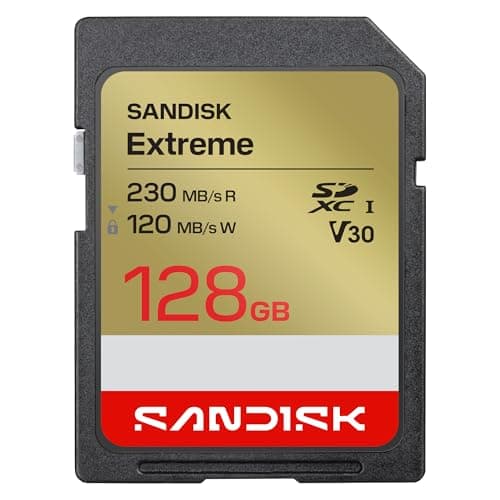
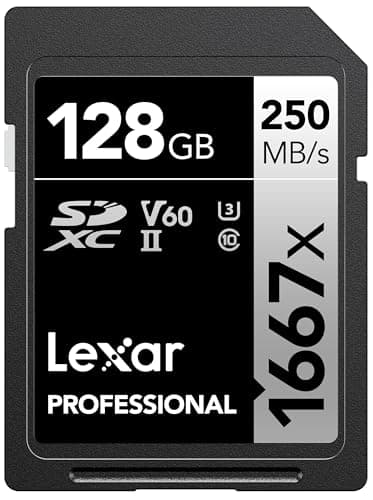
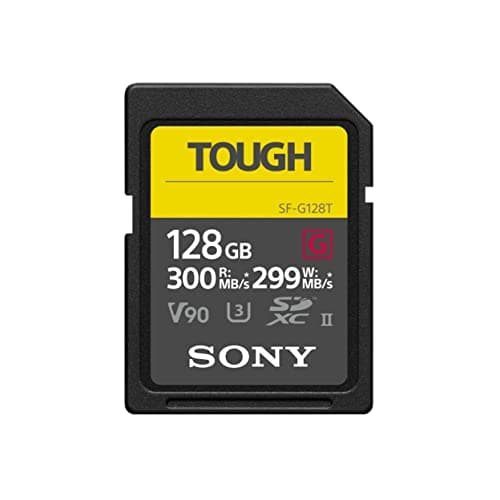
V30, V60 and V90 are guaranteed minimum sustained write speeds of 30, 60 and 90 megabytes per second, and for most beginner cameras a V30 card is all you need. A Sony ZV-E10 records 4K at up to 100 megabits per second and a Canon EOS R50 at about 120, which works out to 12.5 and 15 megabytes per second — half of what a V30 card guarantees, or less. V60 earns its place on cameras such as the Sony a6700 and Canon EOS R10, whose makers ask for it in their highest-bitrate 4K modes. V90 is for All-Intra and slow-motion formats that most beginners never switch on.
This guide goes deeper than the short buyer's guide in our best SD cards for 4K videoranking: what every mark on the label means according to the SD Association, the body that writes the SD standard; why the biggest number on the card is the least useful one; and the arithmetic to check any camera against any card. We have not bench-tested cards. The figures come from the SD Association's pages, a card maker's data sheet and the camera makers' own manuals and spec tables, all linked in Sources.
One card, several rating systems
A current SD card can carry four or five speed marks at once, because the standard has added new systems over the years without retiring the old ones. What they share is the idea: each is a guaranteed minimum speed for sustained, sequential writing under conditions the standard defines — a floor, not a peak. The SD Association states the reason plainly: video recording needs a constant minimum write speed to avoid dropped frames. Here is how the systems line up.
| Mark | Guaranteed write floor | SD Association's suggested use |
|---|
| Class 2, Class 4 | The slowest legacy tiers | Early MPEG-2 and H.264 video recording |
| V6 (grouped with Class 6) | 6MB/s | SD to HD video |
| V10, U1 (grouped with Class 10) | 10MB/s | HD to Full HD video |
| V30, U3 | 30MB/s | Full HD to 4K video |
| V60 | 60MB/s | 4K to 8K video |
| V90 | 90MB/s | 8K video |
Three things follow from that table. First, the marks overlap. U3 and V30 guarantee the same 30MB/s floor, and U1 and V10 the same 10MB/s. That matters because Canon's spec tables ask for "UHS Speed Class 3" while the packaging leads with V30: they are the same requirement. Second, the SD Association defines V60 and V90 on the UHS-II and UHS-III buses, so any V60 or V90 card is a UHS-II card or faster — which matters for which cameras can use it, covered below. Third, the suggested uses are broad strokes. The SD Association pitches V90 at 8K, but what decides your card is your camera's bitrate, not the resolution printed on the box.
The biggest number on the label is a read speed
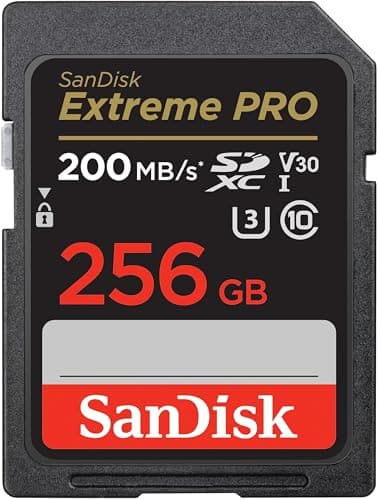
Take the 256GB SanDisk Extreme PRO, the card we rank first below. SanDisk's data sheet gives it three different speeds: up to 200MB/s read, up to 140MB/s write, and V30. Each one answers a different question.
- 200MB/s is a read speed— how fast files come off the card when you copy them to a computer. SanDisk's own footnote says reaching it relies on proprietary technology that goes beyond the UHS-I bus's 104MB/s and requires compatible devices, and it recommends its own reader to hit the figure. It says nothing about recording.
- 140MB/s is a peak write speedfrom SanDisk's internal testing. The same data sheet quotes up to 90MB/s for the 64GB and 128GB versions of the same card, so even this number changes with capacity.
- V30 is the guaranteed floor: at least 30MB/s of sustained writing, under the conditions the SD standard defines. It is the only one of the three that is a guarantee rather than a best case.
A video recording writes continuously for minutes at a time, so the floor is what protects your footage; a card that manages 140MB/s in a short burst guarantees nothing above 30MB/s for a long clip. Peak write speed matters for a different job — clearing a burst of still photos, covered after the picks — and read speed matters only when you offload. SanDisk's fine print makes the general point itself: performance "may be lower depending upon host device, interface, usage conditions and other factors."
The math: divide the bitrate by eight
Camera makers quote video bitrates in megabits per second (Mbps). Card makers quote speeds in megabytes per second (MB/s). There are eight bits in a byte, so divide the camera's number by eight and compare it with the card's floor. A 100Mbps video stream needs 12.5MB/s of sustained writing; a 600Mbps stream needs 75MB/s. Here is what that looks like for four popular beginner and step-up cameras, next to what each maker actually asks for.
| Camera and mode | Bitrate | Needs about | Maker asks for |
|---|
| Sony ZV-E10, 4K at the 60Mbps setting | 60Mbps | 7.5MB/s | Class 10 or U1 |
| Sony ZV-E10, 4K at the 100Mbps setting | 100Mbps | 12.5MB/s | U3 |
| Canon EOS R50, 4K 30p, IPB Standard | About 120Mbps | 15MB/s | U3 |
| Canon EOS R50, 4K 30p, IPB Standard, HDR PQ | About 170Mbps | 21.3MB/s | U3 |
| Canon EOS R10, 4K 60p crop, IPB Standard | About 230Mbps | 28.8MB/s | U3 |
| Canon EOS R10, 4K 60p crop, IPB Standard, HDR PQ | About 340Mbps | 42.5MB/s | V60 |
| Sony a6700, XAVC S or XAVC HS 4K (top setting) | 280Mbps | 35MB/s | V60 |
| Sony a6700, slow and quick motion, XAVC S 4K | 560Mbps | 70MB/s | V90 |
| Sony a6700, XAVC S-I 4K (All-Intra) | 600Mbps | 75MB/s | V90 |
Bitrates and card requirements are from Sony's Help Guide card tables for the ZV-E10 and a6700 and Canon's published specifications for the R50 and R10. Canon lists its bitrates as approximate. The "needs about" column is simply the bitrate divided by eight.
What the table tells you, camera by camera
Sony ZV-E10 and Canon EOS R50:every mode stays well under V30's floor. The ZV-E10 tops out at 100Mbps, or 12.5MB/s. The R50's most demanding mode, Full HD high frame rate with HDR PQ, is about 180Mbps, or 22.5MB/s. Both makers ask for no more than U3. A V30 card covers either camera with room to spare, and a V60 or V90 card buys nothing while recording. Our Canon R50 reviewcovers the rest of that camera's video features.
Canon EOS R10:the interesting one. Its cropped 4K at 60 frames per second writes about 28.8MB/s in standard 8-bit mode — inside V30's 30MB/s floor, but by a hair, and Canon only asks for U3. Switch on HDR PQ and the same mode climbs to about 42.5MB/s, and Canon's table asks for V60. If you shoot 4K 60p on an R10 at all, buy V60 and stop thinking about it.
Sony a6700:Sony organizes its card table by format and lists each format's top bitrate, so its 4K formats as a whole call for V60 or higher, and its slow-motion and All-Intra formats for V90. The Help Guide adds that slow-motion recording raises the bitrate above normal. Even if your everyday setting would fit a V30 on paper, follow the table: V60 for 4K, and V90 only if you use slow and quick motion or XAVC S-I. Our Sony a6700 review explains those video modes.
Leave headroom, and trust the maker's table over the math
The math tells you whether a class is plausible; the camera maker's table tells you what it has actually approved. Bitrates are quoted as approximate or as a maximum, and a card's floor is measured under the standard's test conditions, not inside your camera. So use two rules. When your converted number sits within a few megabytes per second of a class floor, as the R10's 4K 60p does, buy the next class up. And when the maker's table asks for more than the math suggests, as Sony's does for the a6700, follow the table. The bitrate you choose in the menu sets the card you need, so it is worth understanding those settings — our best camera settings for video guide walks through them.
UHS-I vs UHS-II: the bus is a ceiling, not a floor
The speed class is the guaranteed floor. The bus is the connection between card and camera, and it sets the ceiling. The SD Association rates UHS-I at up to 104MB/s and UHS-II at up to 312MB/s. UHS-II cards get there with a second row of pins, which use a different signaling method; full-size UHS-II cards have 17 pins against 9 on UHS-I cards. The first row of pins is kept for backward compatibility, so a UHS-II card works in a UHS-I camera — at UHS-I speeds.
That is why the bus matters for which class you buy. Sony describes the a6700's slot as UHS-II compatible, and Canon's R10 specifications list UHS-II support; the R50 supports UHS-I only. Since V60 and V90 are defined on the UHS-II bus, a UHS-I camera like the R50 cannot take advantage of either rating. It will record happily to a V60 card, but you pay for speed it never uses in camera.
So the answer sorts itself. A V30 UHS-I card is the right card for the ZV-E10, the R50 and most beginner bodies. A V60 UHS-II card is the right card for the a6700's 4K and the R10's 4K 60p. A V90 card is for the a6700's slow-motion and All-Intra formats, or any camera whose manual asks for it. Here are the cards that meet each bar, in that order.
Why the SanDisk Extreme PRO is first
The ranking follows the math above rather than raw speed. Most people reading this shoot on a UHS-I camera whose modes stay under 30MB/s, so a V30 UHS-I card is the right purchase, and the Extreme PRO pairs that floor with SanDisk's published 140MB/s peak write at 256GB and above, which helps with still bursts. The SanDisk Extreme keeps the same V30 floor as the value option — and at 128GB it is quoted faster than the PRO on both reads and writes, which is why Extreme vs Extreme PRO is its own page. The Lexar 1667x is the V60 UHS-II card for the a6700 and R10 modes that call for it, and the Sony TOUGH-G V90 comes last because only a narrow set of modes on these cameras can use it — not because it is a worse card.
Photography: why burst shooters care about write speed
Stills work differently from video. When you hold the shutter down, the camera fires frames into its internal memory faster than it can write them to the card, then empties that memory onto the card as fast as the card and the bus allow. The faster it empties, the longer you can keep shooting before the camera slows down. The SD Association makes the point that RAW files produce more data in a shorter time when you shoot a quick burst.
Canon's R10 specifications show how large the effect can be. At 15 frames per second, Canon lists a maximum burst of about 123 large JPEGs with a standard UHS-I card and about 460 with a UHS-II card. For compact RAW files it is about 40 against 157; for full RAW, 21 against 29. Canon measured those with 32GB cards meeting its own test standards, so treat them as a guide rather than a guarantee, but the direction is clear.
That answers a question people often ask about V30 vs V60 vs V90 for photography: the V number is not the spec that matters for stills. It describes a sustained video floor, not how quickly a card swallows a burst. What matters is the card's write speed and whether your camera has a UHS-II slot to use it. On a UHS-II body like the R10 or a6700, a UHS-II card is the single biggest upgrade for action and wildlife bursts. On a UHS-I body like the R50, a quality UHS-I card with a high write speed is as fast as the camera can go.
A1 and A2: the phone marks that do not matter for cameras
Many cards also carry an A1 or A2 mark. That is the SD Association's Application Performance Class, and it was created for a different job: running apps and app data from a card in a smartphone, including Android's option to adopt a card as internal storage. It measures random performance — small reads and writes scattered across the card — in operations per second. A1 guarantees at least 1,500 random reads and 500 random writes per second, plus a 10MB/s sustained sequential floor; A2 raises the random figures.
Cameras write large files in long sequential runs, which is exactly what the speed classes cover, and the SD Association's A-class page is written entirely around phones and apps. An A1 or A2 mark tells you nothing about video; A1's sequential floor is the same 10MB/s as V10. A card that carries both A2 and V30 is fine in a camera; it is the V30 doing the work.
Capacity, file formats and offloading
The SD Association caps SDHC cards at 32GB, while SDXC goes up to 2TB. For video, buy SDXC: Sony's a6700 Help Guide notes that on an SDHC card, long XAVC S recordings are split into 4GB files. As for how much you need, Canon's own tables are a useful yardstick: a 128GB card holds about 2 hours 21 minutes of R50 4K at IPB Standard, and about 1 hour 14 minutes of R10 4K 60p crop, or about 50 minutes with HDR PQ switched on. Higher bitrates fill cards proportionally faster, which is one more reason not to shoot the highest setting by default.
Offloading is where read speed finally counts, and only if the reader can use it: a UHS-II card needs a UHS-II reader to beat UHS-I speeds on your computer, and SanDisk's 200MB/s figure needs a compatible reader too. Once footage is off the card, a fast drive for editing and backup matters more than the card — see our best portable SSDs. Format each new card in the camera before first use, and budget for two cards rather than one: our beginner camera kit guide costs the whole setup, cards included.
And how big a card to buy
Speed and capacity are separate questions with separate answers. Once you know the V-rating your camera needs, the size is pure arithmetic from the same bitrate figure — about 45GB per hour at 100Mbps, about 162GB per hour at 360Mbps. The full table is in what size SD card do I need.