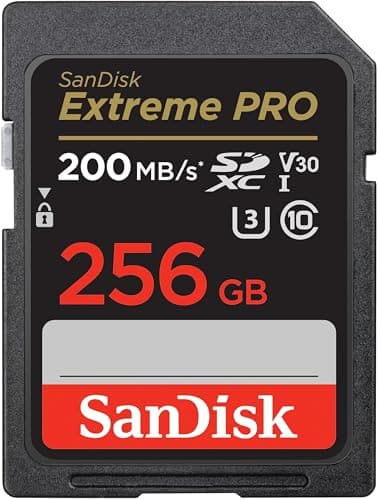
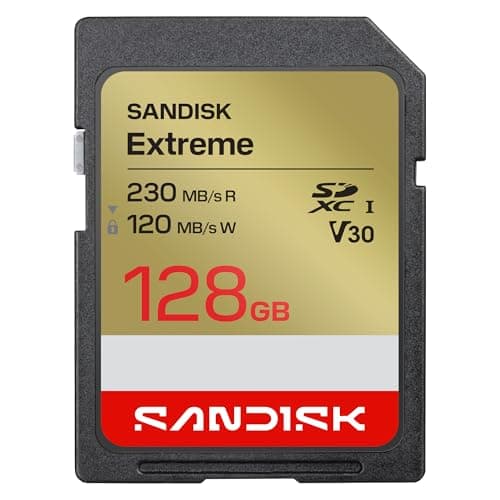
Buy the cheaper one per gigabyte. That is the honest answer for almost everyone reading this, and here is why: the SanDisk Extreme and the Extreme PRO are both UHS-I cards and both carry the V30 Video Speed Class, which guarantees the same 30MB/s sustained write floor. That floor — not the big number on the front of the packet — is what decides whether your camera records 4K without dropping frames. Two cards with the same floor on the same bus record the same video. The PRO does have one genuine advantage, and it is narrower than the name implies: at 256GB and above it quotes a higher sequential writespeed, which clears a camera's buffer faster after a long burst of raw stills. At 128GB, SanDisk's own data sheet rates the PRO slower than the Extreme. If you do not shoot long raw bursts, you are paying for a number you will never meet.
How this page was built: we have not run these two cards through a benchmark rig. The speeds below are the figures SanDisk publishes on the exact listings we link — a 128GB Extreme (SDSDXV9) and a 256GB Extreme PRO (SDSDXXD), both confirmed in stock at the price check behind this page — read alongside the SD Association's published bus-speed and Video Speed Class definitions. Where a number cannot do what it appears to promise, we say so. Prices come from our live price pipeline, never from memory.
The two listings, as published
| Specification | SanDisk Extreme (SDSDXV9) | SanDisk Extreme PRO (SDSDXXD) |
|---|
| Bus | UHS-I | UHS-I |
| Video Speed Class | V30 | V30 |
| UHS Speed Class / Speed Class | U3 / Class 10 | U3 / Class 10 |
| Quoted read speed | Up to 230MB/s | Up to 200MB/s |
| Quoted write speed | Up to 120MB/s (128GB listing) | Up to 140MB/s at 256GB and above; up to 90MB/s at 64GB and 128GB |
| Capacity of the listing we rank | 128GB | 256GB |
| Marketed extras | None quoted on the listing | SanDisk "QuickFlow" technology |
Read that table twice, because it does not say what people expect it to say. The cheaper Extreme quotes the faster read speed of the two— 230MB/s against the PRO's 200MB/s — and the PRO's write advantage only exists at 256GB and above. SanDisk has revised both lines several times, and its own data sheet quotes the Extreme PRO at up to 140MB/s write for 256GB and larger but only up to 90MB/s for the 64GB and 128GB versions of the identical card. If you assumed PRO meant faster at everything, that assumption is the reason this page exists.
The consequence is specific and worth spelling out: at 128GB, the cheaper Extreme is quoted faster than the Extreme PRO on both reads and writes. If 128GB is the capacity you want, this comparison is over — buy the Extreme. The PRO only becomes the faster card at 256GB and up, which is also where its price premium starts to buy you something.
One practical caveat before the specs: the two live listings are different capacities, so the sticker prices are not comparable. Divide by the gigabytes. The price table on this page is live, so do that arithmetic on today's numbers rather than on anything we could have written here.
Why both cards record 4K identically
Video recording is a sustained-write problem, not a peak-speed problem. Your camera writes a continuous stream for as long as you hold the button, and what matters is the slowest moment in that stream, not the fastest. That is exactly what the Video Speed Class measures: the SD Association defines V30 as a guaranteed 30MB/s minimum sustained write, and both of these cards carry it.
Put that next to what consumer 4K actually demands. A 100Mbps recording — the common 4K bitrate on the bodies we rank — is 12.5MB/s, since there are eight bits in a byte. A 200Mbps mode is 25MB/s. Both sit under a V30 floor with room to spare, which is why every pick on best SD cards for 4K video is at least V30 and why going beyond V30 buys nothing for standard 4K. The full ladder of classes is in SD card speed classes explained.
There is one exception worth knowing. If your camera offers an All-Intra codec — Sony calls it XAVC S-I, other makers use ProRes or similar — those modes record every frame whole instead of describing changes between frames, and their bitrates run several times higher than the Long-GOP modes most people use. Check the bitrate your chosen mode actually writes; if it exceeds 240Mbps (30MB/s), a V30 card is no longer guaranteed and you want a V60 like the third pick on this page.
The read speeds on both cards are bus-limited inside your camera
This is the single most useful thing on this page. Both of these cards are UHS-I, and the SD Association publishes the UHS-I bus maximum as 104MB/s in its fastest standard mode, SDR104. A 230MB/s or 200MB/s read figure therefore cannot be reached over a standard UHS-I interface at all. Those speeds come from a proprietary high-speed mode that works only with a matching card reader — SanDisk sells its own — and they describe copying files to a computer, not anything happening while you shoot.
So inside the camera, the read-speed column is marketing for both products. It matters at exactly one moment: when you plug the card into a reader to offload a shoot. If that moment is the bottleneck in your week, the real fix is not a different UHS-I card — it is a UHS-II card and a UHS-II reader, which is a different bus with a published 312MB/s ceiling. That is the argument for the Lexar V60 ranked third below, and for a portable SSD as the place your footage lives afterwards.
Where the Extreme PRO is genuinely the better card
Sequential write, at 256GB and above. The PRO's 256GB listing quotes up to 140MB/s against the 128GB Extreme's 120MB/s, and that difference is real in one situation: emptying a camera's buffer after a long burst of raw stills. Hold the shutter on a camera like the Canon R10, which shoots up to 15fps mechanically and 23fps electronically, and you fill the internal buffer in a couple of seconds; after that, how quickly you can keep shooting is set by how fast the camera can push raw files onto the card. A faster write ceiling shortens that wait.
If that is your photography — sport, birds, pets, kids running — the PRO at 256GB or larger is worth the premium, and buying the larger capacity is doing double duty: it is both the faster version of the card and the one you do not have to swap mid-event. Our wildlife camera roundup is written around the same bottleneck, and best SD cards for 4K video works through the buffer arithmetic per camera.
SanDisk also markets a "QuickFlow" technology on the PRO listing. We have not measured it and we are not going to describe a benefit we cannot verify; treat it as a marketing name attached to the higher write figure rather than a separate feature.
Where the plain Extreme wins
Cost per gigabyte, and the habit it enables. Two 128GB cards are a better buying decision than one 256GB card for most people, because a card is the only component in your kit whose failure loses work that cannot be re-shot. Splitting a trip across two cards means a single failure costs you half a trip rather than all of it, and the cheaper card makes that split affordable.
It also quotes the higher read speed, which — bus limits aside — means that with a proprietary-mode reader the Extreme is the quicker card to offload. That is an odd sentence to write about the non-PRO product, and it is exactly what the published specifications say.
One more honest point in its favor: capacity beats class for most beginners. A 128GB V30 card holds a lot more 4K than a 64GB V60 card, and running out of space ends a shoot just as firmly as a dropped frame does. What size SD card do I need does that arithmetic properly.
Which one, by what you shoot
4K video, any of the bodies we rank: either card, so buy the cheaper per gigabyte. Both guarantee the same 30MB/s sustained write floor, and consumer 4K asks for between 12.5 and 25MB/s of it.
Long raw bursts of stills: Extreme PRO, in 256GB or larger. The higher sequential write ceiling clears the buffer sooner, which is the only difference between these two cards that you can feel while shooting — and it does not apply to the 128GB PRO, which SanDisk rates at 90MB/s.
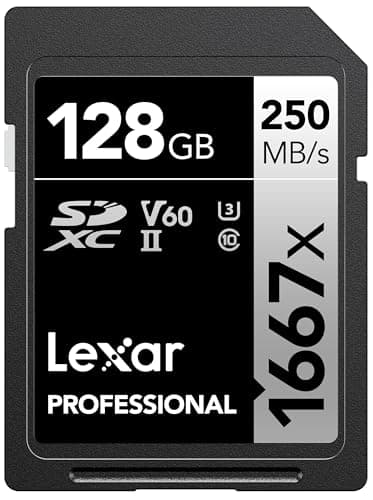
High-bitrate or All-Intra video, 4K/60 at high quality, 6K open-gate: neither — step up to a UHS-II V60 card. That is the Lexar Professional 1667x ranked third here, and the reason is headroom rather than peak speed.
You offload every day and hate waiting: UHS-II card plus a UHS-II reader. No UHS-I card, PRO or not, can cross the 104MB/s bus ceiling without a proprietary reader mode.
You are buying your first card for a new camera: the Extreme, in 128GB or larger, plus a second one. Our beginner camera kit explains where the rest of the budget should go.
Counterfeits, and how to not buy one
SanDisk cards are among the most counterfeited products in photography, and a fake usually announces itself the same way: a card that reports its advertised capacity, writes fine for a few minutes and then corrupts a clip. The practical defense is dull and effective — buy from the retailer or a storefront the brand itself operates rather than an unfamiliar third-party seller, be suspicious of a price well under the going rate for the capacity, and format the card in-camera and record a full-length test clip before you take it somewhere that matters.
The listings we link are the ones our price check reads, which is the same listing you will land on. We do not link marketplace resellers of storage.
Formatting, lifespan and the boring maintenance
Format in the camera that will use the card, not on your computer, so the card gets the file system and allocation the camera expects. Format rather than delete: deleting individual files on a camera fragments the card over time and sustained write performance is where that shows up. Offload, verify the copy, then format before the next shoot.
Flash memory does wear out, but for stills and video shooters the practical failure modes are physical damage, a bent pin, water, or a card pulled while the access light is on — not write exhaustion. Both of these cards carry SanDisk's durability claims and a limited lifetime warranty in the US; neither warranty recovers your photographs, which is the real reason to keep a second copy on an SSD as soon as you are home.
What about microSD, and what about the other brands?
The microSD versions of both cards exist and are rated the same way, but a full-size SD slot should get a full-size card: fewer adapters, fewer contact problems, and the adapter is one more thing to lose. If your camera takes microSD — some compacts and action cameras do — the same V30 logic applies.
Across brands, the picture is similar: Samsung's PRO Ultimate and Lexar's Professional line sit at the same V30 rating for standard 4K, and the sensible way to choose among them is per-gigabyte price from a seller you trust. Best SD cards for 4K video ranks the full field, including the V60 and V90 cards worth buying only if your camera can actually exceed a V30 floor.