Skip to content
Focal & Frame

Kit · Accessories

What Size SD Card Do I Need?

Capacity is arithmetic, not opinion. Take your camera's published bitrate, divide by eight, multiply by sixty - and you have minutes per gigabyte.

By Stephen V.Updated How we research
#ad

We earn a commission when you buy through our Amazon links, at no extra cost to you. It never decides our rankings — we say so when the cheaper pick is the better buy. How this works.

The short answer: 128GB is the right default for most people, and 64GB is enough if you mainly shoot stills. A camera recording 4K at 100Mbps — which is the common high setting on a beginner mirrorless body — writes about 45GB per hour, so 128GB holds roughly 2.8 hours of it and 64GB holds about 1.4 hours. Step to 256GB only if your camera records a genuinely high-bitrate mode: at 360Mbps, which is the Fujifilm X-M5's published maximum, an hour of footage is about 162GB and even a 256GB card holds well under two hours. Everything below is derived from published bitrates, so you can run it for your own camera.

This page is about capacity. The other half of choosing a card is speed — whether the card can keep up with the write — and that is a different question with a different answer, worked through in SD card speed classes explained. A card can be fast enough and far too small, or huge and too slow. You need both right.

The one calculation

Camera makers quote video bitrates in megabits per second (Mbps). Storage is sold in gigabytes (GB). The conversion is two steps and you only have to do it once per camera:

  1. Divide the bitrate by 8 to get megabytes per second. 100Mbps becomes 12.5MB/s.
  2. Multiply by 3,600 for an hour, then divide by 1,000 for gigabytes. 12.5MB/s is 45,000MB per hour, which is about 45GB per hour.

A shortcut worth memorising: divide the Mbps figure by 2.2 and you get GB per hour, near enough. 100Mbps is about 45GB/hr; 60Mbps is about 27GB/hr; 360Mbps is about 162GB/hr. From there, hours on a card is just capacity divided by that number.

Hours per card, by real published bitrate

Every bitrate in the left column is a published specification for a camera this site covers, not an estimate. The hours are the arithmetic above, rounded down, and they are a touch optimistic in practice because a card is never completely empty and files are never perfectly packed.

Camera modeBitratePer hour64GB128GB256GB
Sony ZV-E10, 4K at the 60Mbps setting60Mbps~27GB~2h 20m~4h 45m~9h 30m
Sony ZV-E10, 4K at the 100Mbps setting100Mbps~45GB~1h 25m~2h 50m~5h 40m
Fujifilm X-M5, DCI 4K100Mbps~45GB~1h 25m~2h 50m~5h 40m
Fujifilm X-M5, 6.2K open gate / 4K at maximum bitrate360Mbps~162GB~23m~47m~1h 35m

Two things jump out of that table. First, the 60Mbps and 100Mbps settings on the same camera differ by nearly a factor of two in storage, so the card you need depends on a menu choice as much as on the camera. Second, high-bitrate modes change the answer completely: the jump from 100Mbps to 360Mbps turns a comfortable 128GB card into a 47-minute card.

How many photos fit?

Stills are far less demanding than video and the honest method is to measure rather than trust a chart, because file size varies with the scene — a detailed forest compresses worse than a plain sky, and the same camera will produce noticeably different file sizes for the two.

The thirty-second version: put the card in, shoot ten frames of something typical in the format you actually use, then look at the card's remaining-shots counter or divide the used space by ten. Your camera also does this for you — every body displays an estimated remaining frame count, and it recalculates as it learns what your files weigh.

The useful general shape, though, is this: raw files are several times larger than JPEGs, so shooting raw+JPEG roughly adds the two together, and bracketing or burst shooting multiplies everything. For a 24MP APS-C camera like the Sony a6400 or ZV-E10 — 6000 x 4000 pixels — a 64GB card is a lot of stills and nowhere near enough video. If you shoot both, size the card for the video.

Why two 128GB cards beat one 256GB card

This is the recommendation most buying guides skip, and it is the one that actually matters. A memory card is the only component in your kit that holds data existing nowhere else. Cards fail — rarely, but they do — and they also get lost, left in a card reader, or accidentally formatted. Every one of those events costs you everything on the card.

Splitting the same capacity across two cards halves the size of the worst day of your photographic life, and it gives you a spare when one fills mid-shoot. Two 128GB cards usually cost about the same as one 256GB card, and most beginner bodies have a single slot, so you cannot rely on in-camera backup. The discipline that goes with it: swap the card when it fills rather than deleting from it in camera, and offload to a computer or an external SSD before you reformat.

The one exception is a camera with two card slots set to simultaneous recording, where the second slot is a live backup. On those bodies, matching the two cards matters more than splitting them.

The short answer

Quick picks

#ProductBest forScorePrice
01
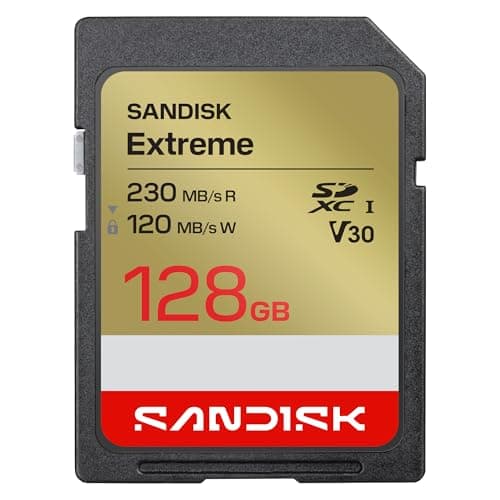
SanDisk SanDisk Extreme SDXC (V30)
SanDisk Extreme SDXC (V30)

The value 4K card. The Extreme PRO's cheaper sibling keeps the all-important V30 rating for 4K, trimming a little read speed to hit a friendlier price.

The best budget 4K card
8.6
$44.99Amazon
02
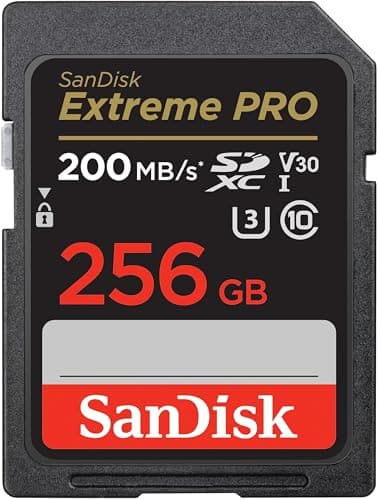
SanDisk SanDisk Extreme PRO SDXC (V30)
SanDisk Extreme PRO SDXC (V30)

The safe default for 4K. A V30 card that guarantees the sustained write speed 4K needs, from the brand most cameras are effectively tuned against.

The best all-round SD card for 4K
8.8
$99.99Amazon
03
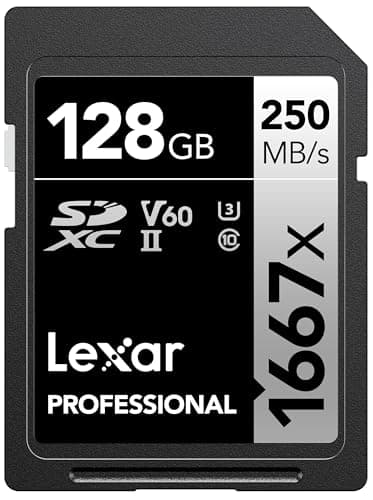
Lexar Lexar Professional 1667x SDXC (V60)
Lexar Professional 1667x SDXC (V60)

The sensible headroom upgrade. A UHS-II, V60 card that doubles the guaranteed write floor of a V30 and reads fast enough to offload footage quickly.

Headroom for high-bitrate and slow-motion 4K
8.2
$93.43Amazon

#ad · Live prices from the Amazon Product API, as of October 16, 2026. Where we have no verified live price, we show none — we would rather leave a gap than print a number that has rotted.

In detail

The picks, in full

01
SanDisk SanDisk Extreme SDXC (V30)

The best budget 4K card

SanDisk Extreme SDXC (V30)

UHS-I bus, V30 (30MB/s sustained write)Up to ~230MB/s readClass 10 / U3Capacities to 1TB
8.6/10

The value 4K card. The Extreme PRO's cheaper sibling keeps the all-important V30 rating for 4K, trimming a little read speed to hit a friendlier price.

Speed (V-rating)
8
Reliability
7
Capacity value
9
Compatibility
10
Value
9

Pros

  • Keeps the V30 sustained write floor, so it clears standard 4K just as safely as the pricier Extreme PRO
  • Usually cheaper per gigabyte than the PRO, which makes buying two cards (a backup habit worth having) easier
  • SanDisk's reliability and universal UHS-I compatibility carry over — a low-risk budget pick

Cons

  • It's still UHS-I, so offload read speeds are far below any UHS-II card
  • No headroom above V30, so it's not the card for high-bitrate 4K/60 or heavy slow-motion

Don't buy this if…

…you need UHS-II offload speed or a V60/V90 write floor for demanding video. For standard 4K it's ideal; for high-bitrate or slow-motion work, step up to the Lexar or ProGrade V60.

$44.99View on Amazon

Price as of October 16, 2026. Prices change — Amazon's is the one that counts.

#ad · we may earn a commission from this link to SanDisk Extreme SDXC (V30)

02
SanDisk SanDisk Extreme PRO SDXC (V30)

The best all-round SD card for 4K

SanDisk Extreme PRO SDXC (V30)

UHS-I bus, V30 (30MB/s sustained write)Up to ~200MB/s readClass 10 / U3Capacities to 1TB
8.8/10

The safe default for 4K. A V30 card that guarantees the sustained write speed 4K needs, from the brand most cameras are effectively tuned against.

Speed (V-rating)
8
Reliability
9
Capacity value
8
Compatibility
10
Value
9

Pros

  • The V30 rating guarantees a 30MB/s sustained write floor, which covers the bitrate of nearly all consumer 4K without dropped frames
  • UHS-I compatibility means it works in essentially every current mirrorless camera — no card-slot surprises
  • SanDisk's reliability record and near-universal camera testing make it the low-risk default choice

Cons

  • As a UHS-I card, its offload-to-computer read speed tops out well below UHS-II rivals
  • V30 has no headroom for very high-bitrate 4K/60 or heavy slow-motion — for that you want a V60 card

Don't buy this if…

…you shoot high-bitrate 4K/60, 6K or a lot of slow-motion. Those modes can exceed a V30's guaranteed floor — step up to a V60 card like the Lexar 1667x or ProGrade for the headroom.

$99.99View on Amazon

Price as of October 16, 2026. Prices change — Amazon's is the one that counts.

#ad · we may earn a commission from this link to SanDisk Extreme PRO SDXC (V30)

03
Lexar Lexar Professional 1667x SDXC (V60)

Headroom for high-bitrate and slow-motion 4K

Lexar Professional 1667x SDXC (V60)

UHS-II bus, V60 (60MB/s sustained write)Up to ~250MB/s readClass 10 / U3Capacities to 512GB
8.2/10

The sensible headroom upgrade. A UHS-II, V60 card that doubles the guaranteed write floor of a V30 and reads fast enough to offload footage quickly.

Speed (V-rating)
9
Reliability
8
Capacity value
8
Compatibility
8
Value
8

Pros

  • The V60 rating guarantees a 60MB/s sustained write floor — real headroom for high-bitrate 4K/60 and slow-motion clips
  • UHS-II read speeds make copying a full card to your computer far quicker than any UHS-I card
  • A well-priced way into UHS-II, so you get the faster bus without paying V90 money

Cons

  • The UHS-II speed only kicks in on cameras and readers with UHS-II support — in a UHS-I camera it falls back to UHS-I rates
  • V60 is overkill for standard 4K/30, where a cheaper V30 already clears the requirement

Don't buy this if…

…your camera only shoots standard 4K/30 and is UHS-I anyway. You'd pay for a faster bus and higher write floor you'll never reach — a SanDisk Extreme PRO V30 does that job for less.

$93.43View on Amazon

Price as of October 16, 2026. Prices change — Amazon's is the one that counts.

#ad · we may earn a commission from this link to Lexar Professional 1667x SDXC (V60)

The size recommendation, by what you shoot

Stills only, beginner: 64GB, and buy two. You will not fill it in a day and the second card is cheap insurance.

Mixed stills and 4K video, which is most people: 128GB is the default, in pairs. At the 100Mbps settings most beginner cameras use, that is a shoot day with headroom.

Long-form video, events, or a camera with a high-bitrate mode:256GB, and check your camera's published maximum bitrate before you decide one is enough. At 360Mbps it is not.

Anything beyond that: the answer stops being a bigger card and becomes offloading in the field. A 512GB card is a large amount of unduplicated data to carry around, and a portable SSD is cheaper per gigabyte and safer. The full ranking is on best portable SSDs.

Capacity classes: SDHC, SDXC and SDUC

The capacity label on a card is also a format standard, and it is the reason a very large card sometimes does not work in an older camera. The SD Association defines SDHC up to 32GB, SDXC from 64GB to 2TB, and SDUC above that. A camera that supports SDHC only will not read an SDXC card at all, which is why old bodies cap out at 32GB. Every current mirrorless camera supports SDXC, so any card from 64GB to 1TB is readable — but if you are buying for an older second body, check which standard its manual lists.

The other formatting point: cards 64GB and above ship formatted as exFAT rather than FAT32, which is what removes the old 4GB per-file limit. Always format a new card in the camera rather than on a computer, so the camera writes its own directory structure and cluster size. It takes five seconds and it prevents a specific class of write errors.

Does a bigger card make the camera slower?

No — capacity and speed are independent specifications. What is true, and confusing, is that the same modelof card is often faster in larger capacities: SanDisk's own data sheet quotes up to 140MB/s write for the 256GB Extreme PRO and up to 90MB/s for the 64GB and 128GB versions of the identical card. So buying bigger sometimes buys faster, but the guaranteed floor — the V-rating — is the same across the family. That distinction is unpacked in speed classes explained.

Should I fill a card completely?

Try not to. Write performance commonly degrades as a card approaches full, which is exactly when a long video clip is most likely to stop recording unexpectedly. Treat the last 10% as reserve and swap cards instead — which is another argument for two smaller cards over one large one.

How long do SD cards last?

Longer than most people's cameras, if they are treated as consumables rather than archives. Flash memory wears with write cycles, but ordinary photographic use is nowhere near the endurance limits of a modern card. The practical failure modes are physical — a bent contact, a cracked plastic shell, a card left in a hot car — which is why the ruggedised cards exist and why a card is never a backup. The full ranking with live prices is on best SD cards for 4K video.
How we picked

We do not run a testing lab

We compiled the manufacturers' published specifications and manuals, did the cost math, and scored each product against a published rubric. The scores are judgments from that documented research — they are notmeasurements we took, because we do not have a lab and we are not going to pretend we do. Where a number came from someone else's testing, we name and link them in Sources.

Questions

Frequently asked

What size SD card do I need for 4K video?
128GB for most people. A camera recording 4K at 100Mbps writes about 45GB per hour, so 128GB holds roughly 2.8 hours and 64GB holds about 1.4 hours. If your camera has a high-bitrate mode - the Fujifilm X-M5 publishes up to 360Mbps - an hour is about 162GB and you want 256GB or more.
How many hours of video fit on a 128GB SD card?
Divide 128 by the GB-per-hour figure for your mode. At 60Mbps that is about 27GB/hr, so roughly 4 hours 45 minutes. At 100Mbps it is about 45GB/hr, so roughly 2 hours 50 minutes. At 360Mbps it is about 162GB/hr, so roughly 47 minutes. The bitrate is a menu setting as much as a camera specification.
How do I work out GB per hour from a bitrate?
Divide the Mbps figure by 8 to get MB/s, multiply by 3,600 for an hour, then divide by 1,000 for gigabytes. The shortcut is to divide the Mbps number by 2.2 - 100Mbps is about 45GB/hr, 60Mbps about 27GB/hr, 360Mbps about 162GB/hr.
Is it better to buy one big card or two smaller ones?
Two smaller ones, for the same money. A card is the only thing in your kit holding data that exists nowhere else, so splitting the capacity halves what a single failure, loss or accidental format can cost you - and it gives you a spare when one fills mid-shoot. Most beginner bodies have one slot, so there is no in-camera backup to fall back on.
Will a 512GB card work in my camera?
Almost certainly, if the camera is a current mirrorless body. The SD Association defines SDHC up to 32GB, SDXC from 64GB to 2TB and SDUC above that, and a camera that only supports SDHC cannot read an SDXC card at all. Every current mirrorless camera supports SDXC; check the manual if you are buying for an older second body.
How many photos fit on a 64GB card?
Enough that it is rarely the constraint - but measure rather than trust a chart, because file size depends on the scene. Shoot ten frames in your usual format, divide the space used by ten, and you have your own number. Raw files are several times larger than JPEGs, and your camera's own remaining-shots counter recalculates as it learns what your files weigh.
Should I format a new SD card in the camera or on a computer?
In the camera, always. The camera writes its own directory structure and cluster size, which prevents a specific class of write error you otherwise discover mid-recording. It takes five seconds. Cards 64GB and above ship as exFAT rather than FAT32, which is what removed the old 4GB per-file limit.
Does a bigger SD card write faster?
Capacity and speed are separate specifications, but confusingly the same card model is often faster in larger sizes - SanDisk quotes up to 140MB/s write for the 256GB Extreme PRO and up to 90MB/s for the 64GB and 128GB versions of the same card. The guaranteed floor, the V-rating, is identical across the family.

Keep reading

Receipts

Sources

We do not run a testing lab, and we do not pretend to. Specs come from manufacturer sheets and manuals; where a figure came from someone else's measurement, we name and link them. Where we could not verify something, we say so on the page rather than quietly leaving it out. Read our full method.