The short answer: you need 10-bit if, and only if, you adjust colour after the fact. If you grade — push the contrast, change the look, fix mixed lighting — 10-bit is what stops your sky from turning into visible stripes, and log is what keeps the highlights and shadows recoverable in the first place. If you post footage essentially as the camera recorded it, 10-bit costs you roughly double the file size and buys you nothing you will ever see, and log actively makes your footage look worse because you are publishing the flat version. There is no middle answer. It depends entirely on whether you open an editor and change the colour.
What 10-bit actually means
Bit depth is how many distinct levels of each colour channel the file can store. 8-bit gives 256 levels per channel; 10-bit gives 1,024. Because the three channels combine, that is the difference between about 16.7 million possible colours and about 1.07 billion.
That sounds like it should be about colour accuracy. It is not — it is about gradation. Consider a clear sky going from pale at the horizon to deep overhead. In 8-bit, the camera has 256 steps to describe that transition, and if you then stretch the contrast in an editor, you are spreading those same 256 steps further apart. The result is banding: visible bands or rings where there should be a smooth ramp. With 1,024 steps, the same stretch still has values in between to land on, and the ramp stays smooth.
So the honest framing is: 10-bit does not make an ungraded file look better. It makes a file that will be graded survive the grading.
What 4:2:2 and 4:2:0 mean
Chroma subsampling, which usually gets quoted alongside bit depth and is a separate thing. Video compression exploits the fact that human vision resolves brightness detail much better than colour detail, so it stores full brightness information and throws away some colour resolution. 4:2:0 keeps a quarter of the colour resolution; 4:2:2 keeps half; 4:4:4 keeps all of it.
When does it matter? Mostly at edges between strongly different colours, and dramatically in one specific job: green-screen keying. A 4:2:0 file has soft, low-resolution colour edges, which is exactly what a keyer needs to be sharp. If you shoot against a green screen, 4:2:2 is worth more to you than the bit depth is. For everything else, it is a smaller effect than 10-bit.
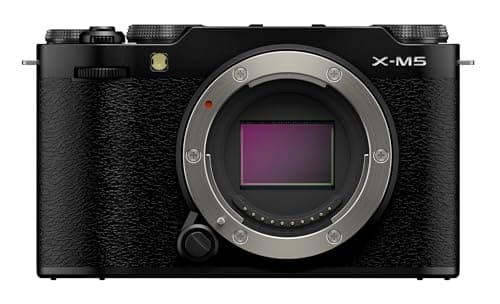
The Fujifilm X-M5 publishes 10-bit 4:2:2 recording, which is the combination worth looking for when a camera advertises both numbers.
What log is, and why it is not the same thing
A log profile — S-Log2 and S-Log3 on Sony, Canon Log 3 on Canon, D-Log M on DJI, F-Log on Fujifilm — records a deliberately flat, low-contrast, desaturated image. It looks washed out and wrong on purpose, because it is storing a wider range of brightness than a normal profile can, by compressing that range into the file logarithmically rather than linearly.
The payoff is dynamic range: detail retained in a bright window and in a dark corner in the same shot. The cost is that the file must be graded before anyone sees it, and here is where the two concepts collide:
Log in 8-bit is the worst of both worlds. Log stretches a wide brightness range into the file, and grading means stretching it back out — which is precisely the operation that produces banding when you only have 256 levels to work with. This is the single most useful thing on this page: if your camera only shoots 8-bit, shooting log is usually a mistake, and a standard or slightly flat profile with the contrast handled in camera will give you a cleaner result. 10-bit is what makes log safe.
The four cameras on this site that record 10-bit log
Every claim below is the manufacturer's published specification, and the prices are live.
| Camera | Log profile | Published video specs | Who it suits |
|---|
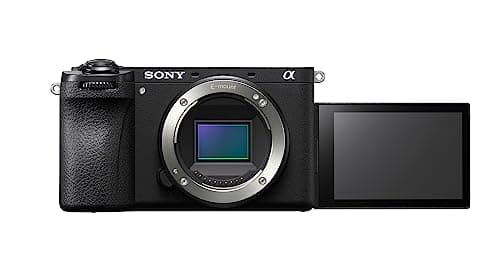
| Sony a6700 | 10-bit S-Log3 | 26MP APS-C, oversampled 4K to 60p from near-full sensor width, 1.58x crop only for 4K120, IBIS, headphone jack | The most complete option — interchangeable lenses, stabilization, and a monitoring jack |
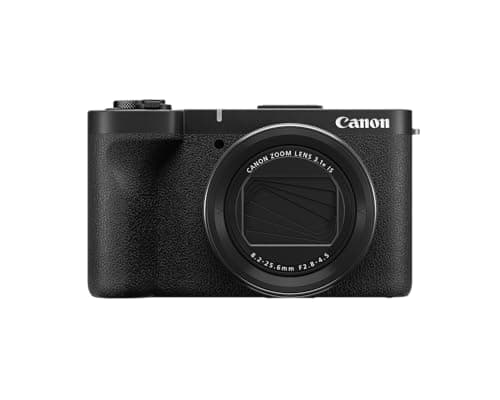
| Canon PowerShot V1 | 10-bit Canon Log 3 | 1.4in sensor, 4K24/25/30 oversampled from 5.7K at full sensor width, ~230Mbps in the top modes, UHS-II slot, mic in + headphone out | Fixed-lens creators who want a graded look without a lens bag |
| Fujifilm X-M5 | 10-bit 4:2:2 recording | 26.1MP X-Trans, 6.2K open gate to 360Mbps, DCI/UHD 4K to 59.94p, no IBIS, no EVF | Creators cutting one take into horizontal and vertical |
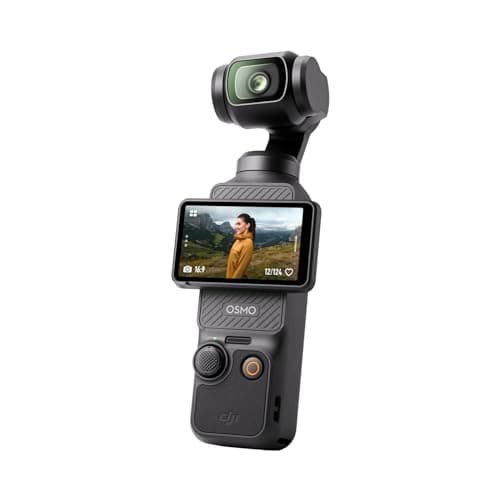
| DJI Osmo Pocket 3 | 10-bit colour capture | 4K to 120fps for slow motion, built-in mechanical gimbal stabilization | Anyone who wants stabilized, gradeable footage in a pocket |
Note what is not on that list: most cameras under about $800 record 8-bit only. The Sony ZV-E10, the Canon R50 and the Nikon Z30 are all excellent video cameras without 10-bit, and that is fine — see the honest version of this in best vlogging cameras for beginners. Paying for 10-bit is only worth it if your workflow uses it.
The short answer
Quick picks
| # | Product | Best for | Score | Price |
|---|
| 01 | Sony a6700Sony's flagship APS-C body finally adds in-body stabilization and AI-driven autofocus to the crop line — the a6400 grown up, at a step-up price. | The step-up APS-C Sony | | $1,498.00·Amazon |
| 02 | Canon PowerShot V1Canon's compact creator answer: a larger-than-usual 1.4-inch sensor, a genuinely wide zoom, and a built-in ND filter. | Compact shooters who want a bigger sensor | | $779.63·Amazon |
| 03 | DJI Osmo Pocket 3A pocket camera with a real 3-axis gimbal built in — the steadiest walking footage here, no editing stabilization needed. | Run-and-gun walking vlogs | | $395.00·Amazon |
| 04 | Fujifilm X-M5A tiny, cheap creator camera with Fujifilm's in-camera color and surprisingly serious video for the money. | Style-conscious budget creators | | $899.00·Amazon |
#ad · Live prices from the Amazon Product API, as of October 16, 2026. Where we have no verified live price, we show none — we would rather leave a gap than print a number that has rotted.
In detail
The picks, in full
The step-up APS-C Sony
Sony a6700
26MP APS-C sensorIn-body 5-axis stabilization4K60 oversampled videoAI-based subject autofocusSony E mount (APS-C)
Sony's flagship APS-C body finally adds in-body stabilization and AI-driven autofocus to the crop line — the a6400 grown up, at a step-up price.
- Image quality
- 9
- Autofocus
- 10
- Video
- 9
- Handling
- 8
- Value
- 7
Pros
- +AI-based subject recognition tracks people, animals and birds with a tenacity that outclasses every cheaper body in this class
- +In-body 5-axis stabilization steadies handheld stills and smooths walking video — the piece the a6400 never had
- +A fully articulating screen and a modernized menu fix the two things owners complained about most on older Sony APS-C bodies
Cons
- −Costs meaningfully more than the a6400 and the entry-level bodies — this is the premium APS-C option, not a budget pick
- −The deep, enthusiast-grade feature set is more camera than an absolute first-timer needs on day one
Don't buy this if…
…you are a first-time buyer on a tight budget, or you shoot mostly stills in good light. Much of what you pay for — IBIS, 4K60, AI tracking — goes untouched at that level, and the a6400 covers the basics for far less.
Compact shooters who want a bigger sensor
Canon PowerShot V1
22MP 1.4-inch sensor16-50mm equiv. zoomBuilt-in 3-stop ND filter4K60 (4K30 uncropped)
Canon's compact creator answer: a larger-than-usual 1.4-inch sensor, a genuinely wide zoom, and a built-in ND filter.
- Video quality
- 8
- Autofocus
- 8
- Screen & handling
- 8
- Audio & inputs
- 7
- Value
- 7
Pros
- +The 1.4-inch sensor is bigger than the 1-inch chips in rival compacts, so it holds up better in low light and blurs backgrounds more
- +A 16-50mm-equivalent zoom goes wide enough for handheld selfie framing, and the built-in ND filter tames bright sun for smooth shutter speeds
- +Canon's Dual Pixel autofocus and a flip-out screen make it an easy point-and-talk creator cam
Cons
- −Bigger and pricier than the pocketable 1-inch compacts, so it's less of a throw-in-a-pocket camera
- −No in-body stabilization: it leans on the lens's optical IS plus digital IS, and 4K60 comes with a 1.4x crop
Don't buy this if…
…you want the smallest possible pocket camera or the cheapest entry. The larger sensor and zoom add bulk and cost — the ZV-1F or Osmo Pocket 3 are truer pocket cameras.
Run-and-gun walking vlogs
DJI Osmo Pocket 3
1-inch sensorBuilt-in 3-axis gimbal4K / 120fpsRotating touchscreen
A pocket camera with a real 3-axis gimbal built in — the steadiest walking footage here, no editing stabilization needed.
- Video quality
- 8
- Autofocus
- 7
- Screen & handling
- 9
- Audio & inputs
- 7
- Value
- 8
Pros
- +The built-in mechanical 3-axis gimbal delivers glass-smooth walking footage that no in-body or digital stabilization can match
- +A 1-inch sensor, 4K up to 120fps, and a rotating touchscreen that flips to frame yourself
- +Tiny enough to actually carry every day, and it pairs seamlessly with DJI's wireless mics
Cons
- −The lens is fixed and moderately wide, and the small form factor means shorter battery life on long shoots
- −Autofocus and low-light latitude trail a proper APS-C body with a fast lens
Don't buy this if…
…you want interchangeable lenses, the shallowest background blur, or the best low-light image. It's a specialist run-and-gun tool, not a do-everything camera — pair it with an APS-C body if you need both.
Style-conscious budget creators
Fujifilm X-M5
26MP APS-C6K open-gate / 4KFilm simulation dialNo IBIS / no EVF
A tiny, cheap creator camera with Fujifilm's in-camera color and surprisingly serious video for the money.
- Video quality
- 8
- Autofocus
- 7
- Screen & handling
- 7
- Audio & inputs
- 6
- Value
- 8
Pros
- +Film simulations plus a dedicated dial bake pleasing color into the file, so a lot of people skip editing entirely
- +Punches well above its price on video, including 6K open-gate capture and a proper vlogging flip screen
- +Genuinely pocketable and one of the cheapest routes into the Fujifilm X system
Cons
- −No in-body stabilization and no viewfinder
- −Small grip and battery, and Fujifilm's autofocus still trails Sony and Canon for face tracking
Don't buy this if…
…you need steady handheld walking footage or reliable tracking of a moving subject. Without IBIS and with weaker AF, it's happiest on a tripod or gimbal for static talking-head work.
The decision, in three questions
1. Do you open an editor and change the colour? If no, stop here: shoot 8-bit in a standard profile, and spend the money on a lens, a microphone or a light instead. Those change every frame you shoot; bit depth changes only frames you grade.
2. Do you shoot high-contrast scenes? Interviews against a bright window, outdoors in harsh sun, anything with both a lit face and a dark background. If yes, log gives you detail you cannot otherwise recover — and you want 10-bit to make the log safe.
3. Do you key a green screen? If yes, 4:2:2 matters more to you than the bit depth. A 4:2:0 file keys badly because its colour edges are a quarter resolution, and no amount of software fixes a soft edge that was never recorded.
Two yeses out of three, and 10-bit log is worth paying for. Zero, and it is a line on a box.
What 10-bit costs you
Storage, roughly double. Higher bit depth and less chroma subsampling both mean more data per second, and the high-bitrate modes that carry 10-bit are where the numbers get serious — 360Mbps on the X-M5 is about 162GB per hour, and around 230Mbps on the V1 is about 105GB per hour. The arithmetic is in what size SD card do I need.
A faster card.A 360Mbps stream needs 45MB/s of sustained write, which is a V60 card territory rather than a V30 one; the V1's slot is UHS-II for the same reason. Which rating you actually need is worked out in SD card speed classes explained.
A computer that can edit it. 10-bit H.265 is harder to decode than 8-bit H.264, and on an older machine the symptom is a timeline that stutters rather than an error message. The usual fix is editing proxies, which is an extra step in the workflow.
A grading step you cannot skip. Log footage must be graded before publishing. If you are not going to do that reliably, do not shoot log — unpublished flat footage is worth less than published normal footage.
Will 10-bit make my video look sharper?
No. Sharpness comes from resolution, lens quality, focus and bitrate; bit depth is about colour gradation only. A 10-bit 1080p file is not sharper than an 8-bit 4K one. If your footage looks soft, the causes are elsewhere — focus, shutter speed, a dirty lens, or a bitrate too low for the detail in the scene.
Can I just add a LUT and skip grading?
A conversion LUT gets log footage back to a normal-looking image in one click, and for a lot of creators that is the entire workflow. It is a legitimate shortcut — but it is still a grading step, it still needs to be applied to every clip, and it will not fix exposure that was wrong when you shot it. Log footage exposed carelessly is not rescued by a LUT; it is log footage exposed carelessly with a LUT on it.
Is 10-bit the same as HDR?
Related but not the same. HDR delivery needs high bit depth to work, which is why HLG profiles are 10-bit, but 10-bit does not make a video HDR by itself — HDR is a delivery format with its own colour space and metadata. Most creators publishing to YouTube and social are delivering standard dynamic range, and using 10-bit purely as grading headroom.
Which should I buy if I am not sure yet?
Honestly: buy the camera that is better at everything else and treat 10-bit as a tiebreaker. Autofocus you can trust, a screen you can see yourself in, a microphone input and a lens you like will improve your videos far more than a bit-depth specification. The full rankings are at best cameras for content creation and best 4K vlogging cameras, and the settings side is in best camera settings for video.
How we picked
We do not run a testing lab
We compiled the manufacturers' published specifications and manuals, did the cost math, and scored each product against a published rubric. The scores are judgments from that documented research — they are notmeasurements we took, because we do not have a lab and we are not going to pretend we do. Where a number came from someone else's testing, we name and link them in Sources.
Questions
Frequently asked
Do I need 10-bit video?+
Only if you grade. 10-bit stores 1,024 levels per colour channel against 8-bit's 256, which is what stops smooth gradients - skies, skin, out-of-focus backgrounds - from banding when you stretch the contrast in an editor. If you publish footage essentially as the camera recorded it, 10-bit roughly doubles your storage and buys you nothing visible.
What is the difference between 10-bit and log?+
They are two separate things usually sold together. Bit depth is how many colour levels the file stores. Log is a flat, low-contrast recording profile that packs a wider brightness range into the file so highlights and shadows stay recoverable. You want 10-bit because log footage has to be stretched back out, and stretching 8-bit log is what produces banding.
Should I shoot log on an 8-bit camera?+
Usually no. Log stretches a wide brightness range into the file and grading stretches it back out, which is precisely the operation that causes banding when you only have 256 levels per channel. On an 8-bit body a standard or slightly flat profile, exposed properly, generally gives a cleaner final image than 8-bit log does.
What does 4:2:2 mean and do I need it?+
Chroma subsampling - how much colour resolution the file keeps. 4:2:0 keeps a quarter, 4:2:2 keeps half, 4:4:4 keeps all of it. It matters most at edges between strongly different colours, and it matters enormously for green-screen keying, because a keyer needs sharp colour edges. For everything else it is a smaller effect than bit depth.
Which cameras on this site record 10-bit log?+
Four: the Sony a6700 (10-bit S-Log3), the Canon PowerShot V1 (10-bit Canon Log 3), the Fujifilm X-M5 (10-bit 4:2:2) and the DJI Osmo Pocket 3 (10-bit colour capture). Most cameras below about $800 - including the excellent ZV-E10, Canon R50 and Nikon Z30 - are 8-bit, and that is fine if you do not grade.
Does 10-bit video look sharper?+
No. Sharpness comes from resolution, lens quality, focus and bitrate; bit depth affects colour gradation only. A 10-bit 1080p file is not sharper than an 8-bit 4K file. If footage looks soft the cause is usually focus, shutter speed, a dirty lens, or a bitrate too low for the detail in the scene.
What does 10-bit cost me in storage?+
Roughly double, and the high-bitrate modes that carry it are where it gets serious: 360Mbps is about 162GB per hour and 230Mbps is about 105GB per hour. You also need a card whose guaranteed write floor clears the bitrate divided by eight - 45MB/s for a 360Mbps stream - and a computer that can decode 10-bit H.265 smoothly.
Can I use a LUT instead of grading log footage?+
Yes, and for many creators a conversion LUT is the whole workflow - one click to get log footage back to a normal-looking image. It is still a step you have to apply to every clip, though, and it will not fix exposure that was wrong in camera. A LUT corrects the profile, not the mistake.
Receipts
Sources
We do not run a testing lab, and we do not pretend to. Specs come from manufacturer sheets and manuals; where a figure came from someone else's measurement, we name and link them. Where we could not verify something, we say so on the page rather than quietly leaving it out. Read our full method.