Skip to content
Focal & Frame

Cameras · Mirrorless Cameras

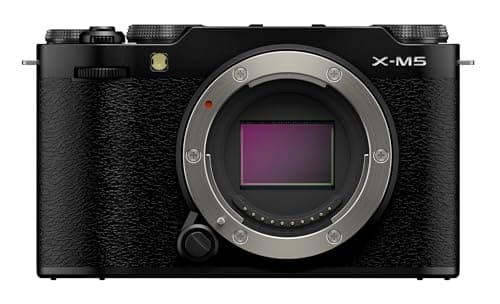
Fujifilm X-M5 Review

Fujifilm's lightest X-mount body records 6.2K open gate and has a film simulation dial. It also has no viewfinder and no stabilization - and that is the whole decision.

By Stephen V.Updated How we research
#ad

We earn a commission when you buy through our Amazon links, at no extra cost to you. It never decides our rankings — we say so when the cheaper pick is the better buy. How this works.

Fujifilm Fujifilm X-M5

Our #1 pick

Fujifilm X-M5

A tiny, cheap creator camera with Fujifilm's colors and surprisingly serious video for the money.

Don't buy it if you need stabilized handheld video or a viewfinder. The X-M5 trims both to hit its size and price; the X-S20 adds IBIS and an EVF if you want them.

#ad · Live Amazon price as of October 16, 2026. No verified price → we show none.

The verdict: buy the X-M5 if you want Fujifilm's colour and genuinely serious video in the smallest, cheapest X-mount body — and buy something else if you need a viewfinder or stabilized handheld footage. The specification is remarkable for the price: a 26.1MP X-Trans CMOS 4 sensor with the X-Processor 5, 6.2K (3:2) recording at up to 360Mbps, DCI and UHD 4K to 59.94p, 10-bit 4:2:2 internally, 20 film simulations on a physical dial, a 3.5mm microphone input and a 3.5mm headphone output, in a 355g body. What it leaves out is the viewfinder and in-body stabilization, and it leaves them out deliberately to hit that size and that price. Every number here is Fujifilm's published specification. We have not tested this camera; see how we pick.

The X-M5 is the cheapest way into the Fujifilm X system with a current sensor, and the spec sheet is unusually honest about what kind of camera it is. There is a film simulation dial on the top plate — a physical control for a creative decision, which tells you Fujifilm expects this camera to be used by people who do not want to edit. There is a 9:16 Short Movie Mode, which tells you it expects vertical video. And there is no EVF, which tells you it expects to be held at arm's length or on a tripod rather than against an eye.

The published specification

SpecificationPublished figure
SensorAPS-C X-Trans CMOS 4, 26.1MP effective, primary colour filter
ProcessorX-Processor 5
Highest video mode6.2K (6240 x 4160, 3:2) at 24/25/29.97p, up to 360Mbps
4KDCI 4K and UHD 4K to 59.94p; DCI 4K to 100Mbps, 2160p to 360Mbps
Slow motionFull HD to 240fps
Codec and colourH.265 / H.264, 10-bit 4:2:2 available
StabilizationDigital, movie mode only — no IBIS
ViewfinderNone
Screen3.5in vari-angle touchscreen, 1.04 million dots, 3:2
Audio3.5mm stereo microphone input with selectable directional modes; 3.5mm headphone output
Continuous shootingUp to 30fps with the electronic shutter (cropped)
Film simulations20 modes, on a dedicated dial
Card slotSingle SD, UHS-I
BatteryNP-W126S; approx. 330 frames, or about 50 minutes of 4K per charge
Weight and sizeApprox. 355g with battery and card; 111.9 x 66.6 x 38.0mm

What stands out, and why

6.2K open gate at 360Mbps is not a normal spec at this price. The 6240 x 4160 mode is the full 3:2 sensor area rather than a 16:9 crop of it, which means one take can be cut into a horizontal video and a vertical one with real resolution left over in both. That is a workflow feature creators pay far more for elsewhere, and the 360Mbps bitrate means the file has enough data in it to survive the crop and the grade.

It also means storage. At 360Mbps you are writing about 162GB per hour, so a 128GB card holds roughly 47 minutes of that mode — the arithmetic is worked out in what size SD card do I need. The single card slot is UHS-I, so the card you buy needs to be able to sustain 45MB/s of writing; speed classes explainedcovers which V-rating that implies.

A headphone jack on a camera this cheap is rare and genuinely useful. It means you can hear what the microphone is actually recording rather than discovering a problem in the edit. Most bodies at this price give you a microphone input and nothing to monitor it with.

20 film simulations on a dial is a real feature, not a gimmick.Fujifilm's simulations are applied in-camera to the JPEG and to the video, and the point is that a competent colour look comes out of the camera with no editing at all. For someone who does not want a grading workflow, that is worth more than most sensor specifications.

The two omissions, stated plainly

No in-body stabilization. The only stabilization is digital, and only in movie mode, which crops the frame to work. Handheld walking footage from this camera will show your footsteps unless you use a wide lens, a stabilized (OIS) lens, or a gimbal — the options are ranked at best gimbals for mirrorless. If handheld stabilized video is the main thing you want, the X-S20 adds IBIS and this body does not.

No viewfinder. You compose on the rear screen, which is fine indoors and on a tripod and genuinely hard in bright sunlight. There is no accessory that fixes this. For stills-first shooters who shoot outdoors, this is the spec that should send you to a body with an EVF — the Sony a6400 or the Nikon Z50 II, both ranked on best mirrorless cameras for beginners.

Two smaller notes worth knowing: the battery is rated at approximately 330 frames or about 50 minutes of 4K, which means a spare battery is not optional for a day of filming; and the card slot is UHS-I rather than UHS-II, which caps the bus speed and is the reason the highest bitrate modes need a card chosen carefully rather than casually.

The short answer

Quick picks

#ProductBest forScorePrice
01
Fujifilm Fujifilm X-M5
Fujifilm X-M5

A tiny, cheap creator camera with Fujifilm's colors and surprisingly serious video for the money.

Style-conscious budget creators
7.8
$899.00Amazon
02
Sony Sony ZV-E10
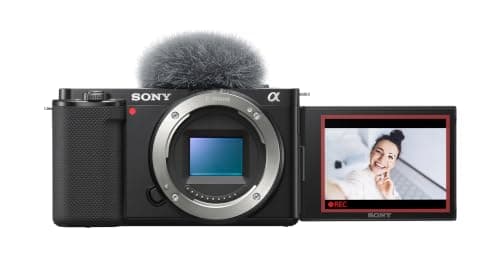
Sony ZV-E10

The safe first camera if you shoot mostly video — flip-out screen, clean autofocus, and the cheapest lens system to grow into.

Video-first beginners
8.0
$798.00Amazon
03
Nikon Nikon Z30
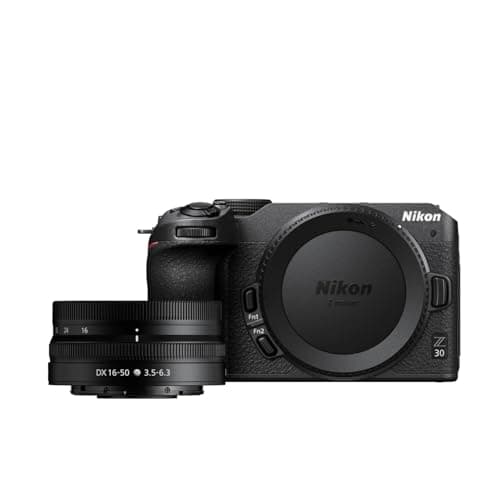
Nikon Z30

Nikon's vlogging-first body: no viewfinder, a great flip screen, and a grip that's comfortable to hold out at arm's length.

Budget vlogging with great handling
7.6
$796.95Amazon

#ad · Live prices from the Amazon Product API, as of October 16, 2026. Where we have no verified live price, we show none — we would rather leave a gap than print a number that has rotted.

In detail

The picks, in full

01
Fujifilm Fujifilm X-M5

Style-conscious budget creators

Fujifilm X-M5

26MP APS-C6K open-gate / 4KFilm simulations dialNo IBIS / no EVF
7.8/10

A tiny, cheap creator camera with Fujifilm's colors and surprisingly serious video for the money.

Image quality
8
Autofocus
8
Video
8
Handling
7
Value
8

Pros

  • Fujifilm's film simulations plus a dedicated dial make lovely color effortless — no editing required
  • Punches above its price on video, including 6K open-gate capture and a proper vlogging flip screen
  • Genuinely pocketable and one of the best-value routes into the Fujifilm X system

Cons

  • No in-body stabilization and no viewfinder
  • Small grip and battery — it's a camera you accessorize for a long shoot

Don't buy this if…

…you need stabilized handheld video or a viewfinder. The X-M5 trims both to hit its size and price; the X-S20 adds IBIS and an EVF if you want them.

$899.00View on Amazon

Price as of October 16, 2026. Prices change — Amazon's is the one that counts.

#ad · we may earn a commission from this link to Fujifilm X-M5

02
Sony Sony ZV-E10

Video-first beginners

Sony ZV-E10

24MP APS-C4K30 (with crop)Fully articulating screenSony E-mount
8.0/10

The safe first camera if you shoot mostly video — flip-out screen, clean autofocus, and the cheapest lens system to grow into.

Image quality
8
Autofocus
9
Video
7
Handling
7
Value
9

Pros

  • Fully articulating screen and a dedicated background-defocus button make it genuinely built for talking to the lens
  • Sony's real-time eye autofocus is the best in this price class and holds your face while you move
  • The E-mount has more affordable third-party lenses (Sigma, Viltrox, Tamron) than any rival system

Cons

  • No electronic viewfinder, so bright-daylight stills are a squint
  • 4K is taken from a cropped, downsampled region and rolling shutter (jello on fast pans) is noticeable

Don't buy this if…

…you shoot a lot of stills outdoors or want to learn with a viewfinder. The missing EVF is the one thing you can't add later — the Canon R50 gives you one for similar money.

$798.00View on Amazon

Price as of October 16, 2026. Prices change — Amazon's is the one that counts.

#ad · we may earn a commission from this link to Sony ZV-E10

03
Nikon Nikon Z30

Budget vlogging with great handling

Nikon Z30

21MP APS-CUncropped 4K30Fully articulating screenNo EVF
7.6/10

Nikon's vlogging-first body: no viewfinder, a great flip screen, and a grip that's comfortable to hold out at arm's length.

Image quality
7
Autofocus
8
Video
7
Handling
8
Value
8

Pros

  • One of the most comfortable small cameras to hold at arm's length — the grip is genuinely good
  • Uncropped 4K30 and a fully articulating screen aimed squarely at solo creators
  • A tally lamp and a large record button make it easy to confirm you're actually recording

Cons

  • No viewfinder and no in-body stabilization
  • Nikon's small Z DX lens range limits your cheap native options

Don't buy this if…

…you also want to shoot a lot of stills in bright sun. Without a viewfinder you're composing on a screen you can barely see outdoors — a body with an EVF suits mixed shooting better.

$796.95View on Amazon

Price as of October 16, 2026. Prices change — Amazon's is the one that counts.

#ad · we may earn a commission from this link to Nikon Z30

Who should buy the X-M5

Creators who shoot both horizontal and vertical. The 6.2K open gate mode plus the 9:16 Short Movie Mode make this one of the cheapest bodies that genuinely handles both orientations from one take. If your output is YouTube and shorts, that is the feature.

People who want good colour without editing. The film simulation dial is the whole argument, and it is a strong one. Nothing else at this price produces a finished-looking file straight out of the camera as reliably.

Anyone who needs the smallest real camera. 355g and 38mm deep is genuinely jacket-pocket territory with a pancake lens, and it is noticeably smaller than the X-S20.

Who should buy something else

If you want stabilized handheld video: the Sony ZV-E10 or the Nikon Z30.Both are ranked above. Neither has IBIS either — this is a class-wide limitation at this price, and the honest answer for stabilized handheld footage is a wide lens or a gimbal regardless of which of the three you buy. What the ZV-E10 adds is a fully articulating screen plus Sony's tracking autofocus and the deepest cheap-lens catalogue of any mount; the Z30 adds Nikon's grip and a simpler menu.

If you shoot stills outdoors: anything with a viewfinder. Composing on a screen in sunlight is the single most common regret with EVF-less bodies, and it is not something you adapt to.

If you want IBIS in the Fujifilm system: the X-S20. Same colour science, adds IBIS and an EVF, costs more and weighs more. We have not ranked it here because the current listing is a lens kit at a price that is poor value against everything else on this page — check it yourself before deciding.

Lenses to put on it

The X-M5 has no stabilization, so lens choice does more work than usual. A fast wide prime hides handshake best; an OIS zoom is the answer for anything long. Fujifilm's own XC and XF primes are excellent and the third-party options on X-mount are now real — Sigma and Viltrox both build native autofocus X-mount lenses, which is covered in third-party vs brand-name lenses. The full ranking is at best Fujifilm X lenses.

Is the X-M5 good for photography, or just video?

It is a genuinely good stills camera with one caveat. The sensor is the same 26.1MP X-Trans CMOS 4 used across the X range, the processor is current, and the film simulations are a stills feature first. The caveat is composition: no viewfinder means bright-light shooting is awkward, and 30fps burst is only available with the electronic shutter and a crop. For deliberate, screen-composed stills it is excellent; for reactive outdoor shooting an EVF body is better.

Does the X-M5 overheat?

We have not tested it and will not claim a number. What the specification tells you is relevant though: about 50 minutes of 4K per battery charge means battery life, not thermal limits, is what ends most sessions, and the highest-bitrate 6.2K mode is the one worth testing yourself with a long take before you rely on it for an event.

X-M5 or ZV-E10 for YouTube?

The X-M5 for colour and for anything where one take becomes both a video and a short; the ZV-E10 for autofocus, a cheaper and deeper lens catalogue, and a screen that articulates fully rather than vari-angle. Both are ranked on best vlogging cameras for YouTube, and the live prices in the table above are usually the tiebreaker.
How we picked

We do not run a testing lab

We compiled the manufacturers' published specifications and manuals, did the cost math, and scored each product against a published rubric. The scores are judgments from that documented research — they are notmeasurements we took, because we do not have a lab and we are not going to pretend we do. Where a number came from someone else's testing, we name and link them in Sources.

Questions

Frequently asked

Is the Fujifilm X-M5 worth buying?
Yes if you want Fujifilm colour and serious video in the smallest, cheapest X-mount body - 26.1MP X-Trans, 6.2K open gate at up to 360Mbps, 10-bit 4:2:2, a headphone jack and 20 film simulations on a dial, at 355g. No if you need a viewfinder or stabilized handheld footage, because it has neither an EVF nor IBIS.
Does the Fujifilm X-M5 have IBIS?
No. Fujifilm's published specification lists digital image stabilization in movie mode only, which crops the frame to work. For stabilized handheld footage you need a wide lens, an OIS-stabilized lens or a gimbal. The X-S20 is the Fujifilm body that adds in-body stabilization.
Does the X-M5 have a viewfinder?
No. You compose on the 3.5-inch 1.04-million-dot vari-angle touchscreen, which is fine indoors and on a tripod and genuinely difficult in bright sunlight. There is no accessory viewfinder that fixes this - if you shoot stills outdoors, a body with an EVF is the better choice.
What video can the Fujifilm X-M5 record?
6.2K (6240 x 4160, 3:2 open gate) at 24/25/29.97p up to 360Mbps, DCI 4K and UHD 4K to 59.94p, and Full HD to 240fps for slow motion, in H.265 or H.264 with 10-bit 4:2:2 available. There is also a 9:16 Short Movie Mode for vertical video.
What SD card does the X-M5 need?
One that can sustain the bitrate. At 360Mbps the camera writes 45MB/s, so the card's guaranteed write floor - its V-rating - needs to clear that, and the single slot is UHS-I rather than UHS-II. For capacity, 360Mbps is about 162GB per hour, so a 128GB card holds roughly 47 minutes of that mode.
How long does the X-M5 battery last?
Fujifilm publishes approximately 330 frames in normal mode, or about 50 minutes of 4K video, from the NP-W126S battery. For a day of filming a spare battery is not optional - and because the camera charges over USB-C, a power bank is the other half of that answer.
X-M5 or X-S20?
The X-S20 adds in-body stabilization and a viewfinder, which are exactly the two things the X-M5 leaves out, at a higher price and weight. Same colour science either way. We have not ranked the X-S20 on this page because its current listing is a lens kit at poor value against the alternatives - check the live price yourself.
Is the X-M5 good for photography?
Yes, with one caveat. It uses the same 26.1MP X-Trans CMOS 4 sensor as the rest of the X range with the current X-Processor 5, and the film simulations are a stills feature first. The caveat is composition without a viewfinder, plus the fact that 30fps burst is electronic-shutter-only and cropped.

Keep reading

Receipts

Sources

We do not run a testing lab, and we do not pretend to. Specs come from manufacturer sheets and manuals; where a figure came from someone else's measurement, we name and link them. Where we could not verify something, we say so on the page rather than quietly leaving it out. Read our full method.