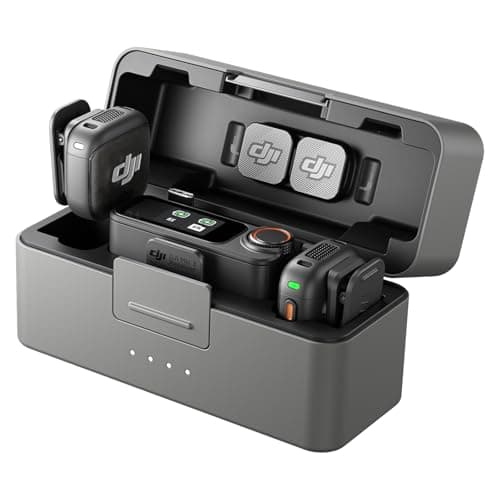
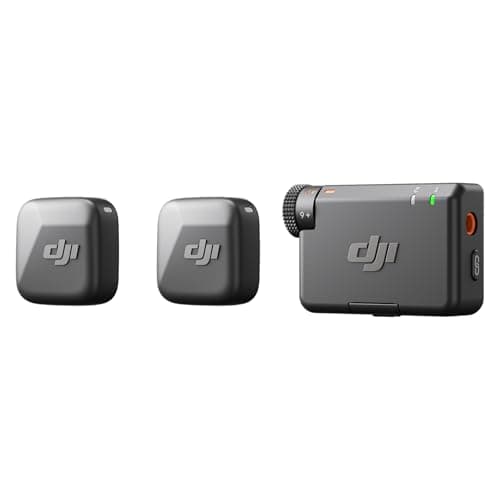
For most creators the DJI Mic Mini is the kit to buy, and the Mic 3 is the one to skip. Both are two-transmitter wireless systems from the same manufacturer, both are rated to the same 400m of range, and the Mini's transmitter is the lighter of the two (about 10g against 16g) with the longer published battery life (about 11.5 hours against 8). The Mic 3 costs several times as much and spends almost all of that money on one thing: a recording safety net. Buy the Mic 3 if your recordings are takes you cannot repeat — interviews, weddings, one-shot client work — because it writes dual-file 32-bit float copies inside each transmitter, carries timecode, and has a monitor output so you can hear what you are actually capturing. If you film yourself and can simply shoot the line again, that safety net is money spent on a problem you do not have.
This is the within-brand version of the wireless microphone question, and it is the one people get wrong most often, because the flagship's spec sheet is longer in every direction except the two numbers a day of filming actually tests. The Mic 3 is the better piece of equipment. It is not the better buy for most of the people comparing them, who are usually buying a first wireless kit for a YouTube channel.
Everything below is DJI's own published specification, plus findings from reviewers who tested the Mic 3 — all named and linked in Sources. We have not tested either kit and we do not run an audio lab; see how we research. Prices are read live and stamped with the date, because the gap between these two moves and the whole decision hangs on it.
At a glance
| Published spec | DJI Mic Mini (2 TX + 1 RX) | DJI Mic 3 (2 TX + 1 RX + case) |
|---|
| In the box | 2 transmitters, 1 camera receiver | 2 transmitters, 1 receiver, charging case |
| Transmitter weight | About 10g, excluding the clip magnet | 16g, including the magnet |
| Receiver weight | About 17.8g, including the interface cover | 25.1g |
| Transmitter battery | About 11.5 hours | 8 hours |
| Receiver battery | About 10.5 hours | 10 hours |
| Charging case | Sold in other Mic Mini kits, not in this one | Included; recharges 2 transmitters + 1 receiver about 2.4 times |
| Max transmission distance | 400m, open and interference-free | 400m open; 80m in DJI's simulated high-interference test |
| Internal recording | Not published | Yes — up to 57.3h single-file 24-bit, or 21.5h dual-file 32-bit float |
| Bit depth / sample rate | Not published | 48kHz, switchable 32-bit float or 24-bit |
| Max SPL | 120 dB SPL | 126 dB SPL at 1% THD (130 dB at 10%) |
| Timecode | Not published | Yes — LTC in and out over 3.5mm TRS, plus USB-C output |
| Monitor output on receiver | Not published | Yes — 20mW at 1kHz into 32 ohms |
| Charge time | Not published | About 50 minutes, transmitter or receiver |
"Not published" means exactly that: DJI's Mic Mini specification page leaves those fields blank rather than quoting a figure, so we leave them blank too instead of borrowing the flagship's number. One of them is not ambiguous, though — the Mic Mini has no onboard recording, and DJI does not claim it does.
The deciding question: can you shoot the line again?
Everything the Mic 3 adds over the Mini is insurance against a recording you cannot redo. Thirty-two-bit float is the headline. In an ordinary 24-bit recording, a shout that goes past the top of the scale is clipped — the waveform is squared off and the information is gone, so no amount of editing brings the word back. A 32-bit float file has so much headroom that the loud moment is captured intact and can simply be pulled back down in the edit. DJI goes a step further and writes two internal files per transmitter in dual-file mode, so a radio dropout between transmitter and receiver does not cost you the take either; the audio was on the transmitter the whole time.
That is genuinely valuable, and it is worth the money for one kind of work: the interview, the ceremony, the client shoot, the podcast guest who will not be in the room again. It is worth nothing at all to somebody filming themselves in their own kitchen, because the fix for a bad level there is to say the sentence again. Be honest about which of those you are before you decide — that single answer is worth more than every other line in the table above.
Where the cheap kit genuinely beats the flagship
Two places, both from DJI's own numbers, and both of them things you feel on a filming day. The Mini's transmitter is about 10g excluding the clip magnet against the Mic 3's 16g with it — a small absolute difference that matters on a thin shirt or on a guest who keeps noticing the thing on their collar. And DJI publishes about 11.5 hours of transmitter life for the Mini against 8 hours for the Mic 3. The flagship offsets that with its charging case, but a case is something you have to remember, carry and keep charged; the Mini simply runs longer.
Range is a wash. Both are rated at 400m in an open, interference-free environment, which is a best case neither will see indoors — DJI's own high-interference test puts the Mic 3 at 80m, and the honest way to read either figure is as a ranking rather than a promise. Max SPL does differ, 126 dB against 120 dB, and that is real headroom for shouting or a drum kit; it is also six decibels that most talking-head video will never approach.
What the charging case actually buys
DJI rates the Mic 3's case at roughly 2.4 full recharges of two transmitters and a receiver, which turns an 8-hour transmitter into something closer to a full shooting day with the kit tucked away between takes. The case is also where the system lives: it is the storage box, so the transmitters are charged by default rather than charged if you remembered. If you shoot all-day events away from power, that is the Mic 3's quiet second argument after 32-bit float, and a better one than the specification table makes it look. Mic Mini kits that include a case exist too — the kit ranked on this page is the two-transmitter one without it, which is part of why it is priced where it is.
Features the Mic 3 has that most buyers will never use
Timecode is the clearest example. The Mic 3 can send and receive LTC over its 3.5mm TRS port and output it over USB-C, with a quoted 0.5 ppm offset — less than a frame of drift in 24 hours. That solves a real problem on a multi-camera shoot where several recorders have to be lined up in post. On a single-camera YouTube setup it solves nothing, because the audio is already on the camera's own timeline.
The receiver's monitor output is the opposite case — a flagship feature that is worth more to a beginner than it sounds. DJI rates it at 20mW into 32 ohms, which is a headphone jack, and plenty of the budget camera bodies this site covers have no headphone socket at all. Without one you cannot hear the feed until you review the footage, which is how people discover a dead transmitter forty minutes late. Our wireless microphone ranking flags which kits hand that port back to you.
What neither of them does
Neither transmitter takes an external lavalier. On both kits the capsule is inside the clip-on unit, so the microphone is visible on the shirt and there is no way to hide a wired lav under clothing the way you can with Rode's transmitters. If an invisible mic matters — drama, formalwear, a corporate client who does not want a box on camera — neither of these is the right system, and you want a kit whose transmitter has a 3.5mm input instead.
Neither includes a phone receiver in the configuration priced here either. DJI sells a small USB-C mobile receiver for the Mini line, and if phone filming is your main use, read best microphones for phone video before you buy — the adapter traps there cost people more money than the microphone choice does.
So which one, in one line each
Buy the DJI Mic Mini if you film yourself, can repeat a take, and want the lightest transmitter and the longest battery for the least money. It is the right first wireless kit for the large majority of people reading this, and the money you do not spend buys a light, which will improve your video more than the flagship microphone would.
Buy the DJI Mic 3 if the recording is unrepeatable, if you need to monitor through headphones, if you shoot all day away from power, or if you will eventually mic more than two people. You are not buying better sound — you are buying the ability to recover from a mistake, and on some jobs that is the whole product.
Two neighboring questions, if this page has not settled it. If you are weighing DJI against Rode's flagship, that head-to-head is at DJI Mic 3 vs Rode Wireless GO III. If you are weighing the Mini against the other cheap two-person kit, read DJI Mic Mini vs Hollyland Lark M2. And if the previous DJI generation is still on a shelf near you, DJI Mic 2 vs DJI Mic 3 covers whether the discount is real.