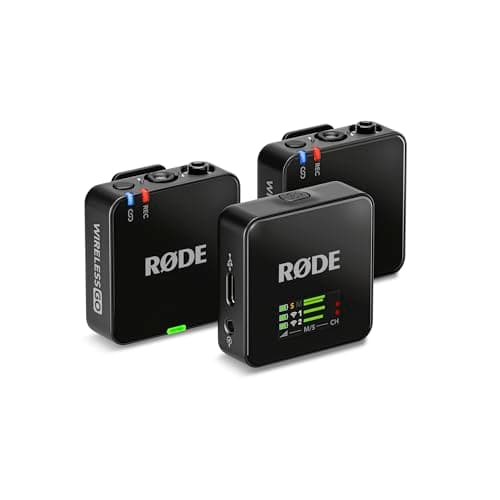
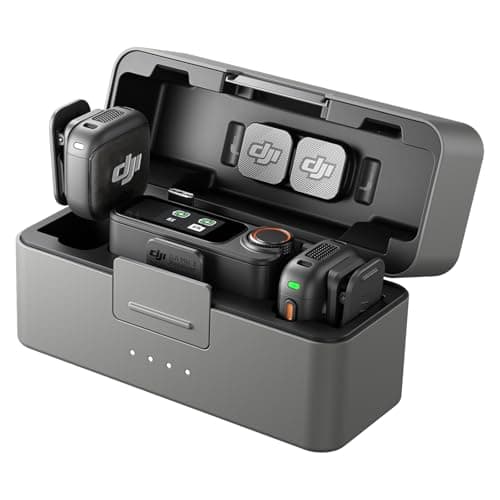
Buy the DJI Mic 3 if you want the smallest, lightest transmitters, a charging case in the box, timecode and built-in background-sound reduction. Buy the Rode Wireless GO III if you need to plug in a hidden lavalier mic, want far more onboard backup storage, or would rather not depend on DJI's uneven US supply. Both kits record their own 32-bit float backup and both adjust gain automatically, so neither is a risky purchase. It is a close enough call that our own two microphone rankings split on it: the DJI tops our best wireless microphones list and the Rode tops our best vlogging microphones list. What decides it is physical, not sonic.
The usual disclosure: we have not tested either kit in a lab or recorded them side by side. Everything below comes from DJI's and Rode's published specifications, the box contents each company lists, and the documented findings of reviewers who used them — all named and linked in Sources. Informed judgment, not measurements.
At a glance
| Spec | DJI Mic 3 | Rode Wireless GO III |
|---|
| In the box | 2 transmitters, 1 receiver, charging case, USB-C phone adapter | 2 transmitters, 1 receiver, SC33 charging hub, pouch, 3 windshields, 3 cables |
| Transmitter weight | 16g (with magnet) | 35g |
| Transmitter size | About 29 × 28 × 16mm | 46.5 × 44 × 20mm |
| Lavalier input on transmitter | None | Locking 3.5mm TRS |
| Onboard backup recording | 32-bit float: 21.5 hr dual file, 43 hr single file | 32-bit float, 32GB per transmitter (40+ hr) |
| Automatic levels | Adaptive gain control | GainAssist, plus a safety channel |
| Rated battery | 8 hr transmitter, 10 hr receiver; up to 28 hr with the case | Up to 7 hr (charging case sold separately) |
| Quoted range | 400m open, interference-free | 260m line of sight |
| Timecode | Yes | No |
| Headphone monitoring | 3.5mm monitor port on the receiver | 3.5mm jack on the receiver |
Figures are the manufacturers' own: DJI's Mic 3 specification page and FAQ, the kit contents on the Amazon listing we link, and Rode's Wireless GO (Gen 3) data sheet. Timecode on the Rode is marked no because SoundGuys listed its absence as a con.
The five things that actually differ
1. Size: the DJI weighs less than half as much
DJI lists each Mic 3 transmitter at 16g including its magnet, and roughly 29 × 28 × 16mm. Rode's data sheet puts the Wireless GO III transmitter at 35g and 46.5 × 44 × 20mm. On paper that is a handful of grams. On a collar it is the difference between something you forget you are wearing and something that visibly tugs a light T-shirt down. If you film yourself in everyday clothes, the Mic 3's size is the advantage you will notice every single day. The one catch is the flip side of that design: the DJI holds on by magnet or clip, and on very thin fabric a magnet can drag. The Rode simply clips on.
2. The lavalier input: the Rode's decisive advantage
Each Wireless GO III transmitter has a locking 3.5mm input. That means you can plug in a separate lavalier microphone, hide the capsule under a collar or a lapel, and tuck the transmitter out of sight on a belt. The DJI Mic 3 transmitter has no 3.5mm input at all — SoundGuys and Camera Jabber both called out its absence — so the microphone built into the visible unit is the only one you can use. Neither kit includes a lavalier; with the Rode you buy one separately, and with the DJI you cannot use one. DJI's previous Mic 2 does have a 3.5mm input on each transmitter; our DJI Mic 2 vs DJI Mic 3 comparison weighs that against everything the Mic 3 adds.
This matters more than it sounds. Interviews where the subject should not look wired, weddings and events, and sponsored videos where a brand logo on your chest is unwelcome — SoundGuys specifically listed the Mic 3's obvious branding as a con — all want a hidden mic. If any of that describes your work, you can stop reading here: buy the Rode.
3. Charging: a case in the box against a hub and a pouch
The Mic 3 ships with a charging case. DJI rates the transmitters at 8 hours and the receiver at 10, and the Amazon listing puts the total at up to 28 hours with the case topping them up. You drop the units back in between shoots and they are ready the next time you open it — an everyday convenience a spec table undersells. The flip side is that the case is how the transmitters charge: SoundGuys notes they have no USB port of their own, so leave the case behind and you cannot top them up.
The Wireless GO III ships with Rode's SC33 charging hub — a bar that plugs into all three units at once over USB-C — and a soft carry pouch. Rode rates operating time at up to 7 hours. Rode's Charge Case+ adds two full recharges, for up to 21 hours of use, and lets you pull recordings and update firmware on all three units together, but it is a separate purchase.
One trap worth flagging. When we checked for this page, the Amazon listing title for the Wireless GO III we link read "(2 TX + 1 RX + Charging Case)", while the same listing's feature bullets describe a charging hub and a carry pouch — which matches Rode's own box contents and the product photo. Go by Rode's list: assume there is no case in the box, and if a case matters to you, add the Charge Case+ to the Rode's price before you compare the two.
4. The safety nets: both excellent, built differently
This is where the two kits are closest, and it is the reason both are safe recommendations for a beginner. Both transmitters record their own 32-bit float backup, which means a take that clipped or was recorded too quietly can be pulled back to usable in editing. Our wireless microphone guide explains what 32-bit float does in plain terms. And both kits adjust gain automatically, which removes the most common way beginners ruin audio in the first place.
DJI's version records dual files — per SoundGuys, a processed track and an unprocessed one at the same time — and DJI lists 21.5 hours of 32-bit float dual-file recording, or 43 hours as a single file. Rode puts 32GB in each transmitter for over 40 hours of backup, and adds a safety channel alongside GainAssist: a second, lower-level copy of the audio on the output to your camera, so a sudden laugh or shout that overloads the main track has a clean spare. Both hold far more than a shooting day. Decide on the other four differences; this one is a tie.
5. The extras: DJI does more, Rode plays well with other gear
On paper the DJI has the longer feature list. DJI lists timecode support, which matters when you run more than one camera and sync footage in editing. The listing adds two levels of background-sound reduction and room for up to four transmitters and eight receivers, so a two-person kit can grow into a group podcast or a multi-camera shoot. Owners of DJI's own cameras get one more: a Mic 3 transmitter connects directly to cameras such as the Osmo Pocket 3 with no receiver at all.
The Rode's extras are about fitting into a wider kit. Its transmitters work with Rode's other Series IV receivers, including the Wireless PRO and the RodeCaster range, which is worth something if you already own Rode gear, and the transmitters charge over USB-C without needing a case. Against that, SoundGuys' review listed no timecode among its cons and noted the lack of built-in background-sound reduction. Both receivers have a 3.5mm port for monitoring on headphones, so you can hear what you are recording on either. One criticism is DJI's alone: SoundGuys was scathing about the Mic 3's companion app experience, which is worth knowing if you like to set gear up from your phone.
Range, for the record, is not a real differentiator. DJI quotes 400m in open, interference-free conditions and 80m in its own simulated high-interference test; Rode quotes 260m line of sight. Both reach far past the point where a camera can still see you.
Price and availability
The two kits sit in the same price bracket, and which one is cheaper moves with sales. When we checked for this page the Rode was the cheaper of the two — but add the Charge Case+ if you want a like-for-like match for the DJI's case, and check both live prices in the picks below before you decide, because a discount on either can flip the answer.
Availability is the other half of the question. At the Mic 3's August 2025 launch, DJI said it would not be sold immediately through its own official US channels, though US retailers including Amazon carried it anyway, as PetaPixel reported at the time. The listing we link is sold by Amazon itself, and we confirmed it was purchasable when we published. DJI's US supply has wobbled before, which is why every DJI audio pick on this site sits beside a non-DJI alternative. Here the alternative is a genuine equal, not a fallback.
Who should buy which
- You film yourself, alone, in everyday clothes: the DJI Mic 3. Smaller on your collar, charged in its case, and nothing to set up.
- You interview people, or the mic has to be invisible: the Rode Wireless GO III. The lavalier input is the whole reason, and the DJI has no answer to it.
- You run two cameras, or sync sound in editing: the DJI Mic 3, for its timecode support.
- You already shoot on a DJI Osmo camera: the DJI Mic 3, since a transmitter can connect to the camera without the receiver.
- You already own Rode Series IV gear: the Rode Wireless GO III, which works with those receivers.
- You record long events or want the biggest backup: the Rode Wireless GO III, with over 40 hours of onboard recording per transmitter.
- You would rather not depend on DJI's US availability: the Rode Wireless GO III.
Check your camera before either
Both receivers plug into a camera's 3.5mm microphone input, so the camera needs one. Most bodies built for video have it; some compact and entry-level models do not, and a wireless kit is not much use on a camera with nowhere to plug it in. Every camera in our best cameras for YouTube ranking has a mic input. For phones, the DJI kit includes a USB-C phone adapter, and DJI sells the Lightning version separately; Rode includes both USB-C and Lightning cables.
What neither kit fixes
A wireless kit keeps the microphone close to your mouth. It does not fix an echoey room, and it does not fix wind. Outdoors, use the furry windshields — Rode includes three, and SoundGuys lists a wind muff in the DJI box. Clip the transmitter on the center of your chest, clear of jackets, zips and necklaces that rub against it, and point the microphone toward your mouth. Get placement and wind protection right and either kit will serve you well; get them wrong and neither will.
And if you never move more than arm's length from the camera, you may not need a wireless kit at all. An on-camera shotgun is cheaper, has nothing to charge and cannot drop a signal — see best shotgun microphones. Our guide to filming yourself covers where each type of mic fits in a solo setup.
The bottom line
For most solo creators the DJI Mic 3 is the nicer kit to live with: less than half the weight on your collar, a case that keeps it charged, and the more generous feature list. The Rode Wireless GO III is the better tool for anyone who needs a hidden lavalier, wants the deepest onboard backup, or values a supply line that does not run through DJI — and it was the cheaper buy when we checked. Both carry the same 32-bit float safety net. Neither is a mistake; pick the one whose single advantage you would actually use.