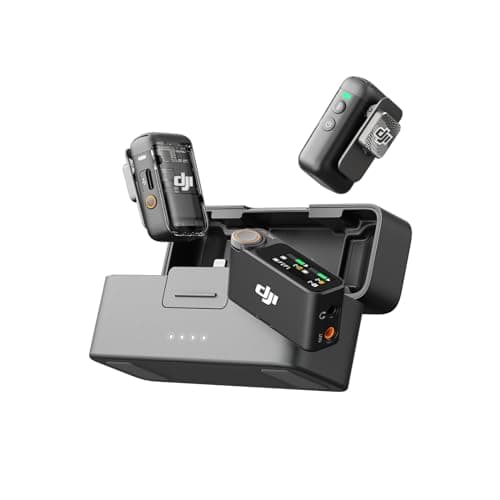
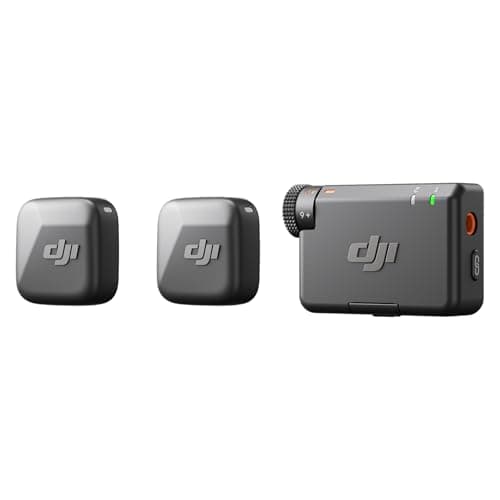
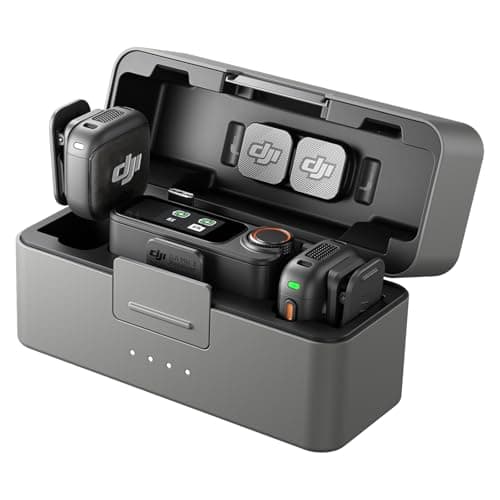
Buy the DJI Mic 3. Its transmitters weigh 16g against the Mic 2's 28g, it sets its own levels, it holds four times the backup storage, it runs 28 hours with its case against 18, and it adds timecode. Buy the DJI Mic 2 only if you need to plug in a wired lavalier mic — the Mic 3 transmitters have no 3.5mm input — or if you already own Mic 2 units you want to keep using. When we checked for this page, the two kits were close in price, which takes away the older kit's usual argument. What is left in the Mic 2's favor is a short list of things DJI removed from the Mic 3, and for some creators one of them is a dealbreaker.
The usual disclosure: we have not tested either kit or recorded them side by side. Everything below comes from DJI's spec pages, user manuals and FAQs for both kits, and from SoundGuys' side-by-side comparison — all linked in Sources. If you are weighing the Mic 3 against a rival brand rather than its own predecessor, that is a different question, and our DJI Mic 3 vs Rode Wireless GO III comparison answers it.
At a glance
| Spec | DJI Mic 2 | DJI Mic 3 |
|---|
| In the box (2 TX + 1 RX kit) | Charging case, USB-C and Lightning phone adapters, 3.5mm camera cable, 2 windscreens, carry bag | Charging case, USB-C phone adapter (Lightning adapter sold separately) |
| Transmitter weight | 28g | 16g (with magnet) |
| Transmitter size | About 46 × 31 × 22mm | About 29 × 28 × 16mm |
| Lavalier input on transmitter | 3.5mm TRS | None |
| USB-C port on transmitter | Yes (charging, file copy, firmware) | None (recordings copy off through the case) |
| Backup storage per transmitter | 8GB: about 11 hr of 32-bit float | 32GB: 43 hr of 32-bit float, or 21.5 hr dual file |
| Level protection | Manual gain, plus a -6dB safety-track output mode | Adaptive gain control (Automatic and Dynamic modes) |
| Background-sound reduction | On or off | Two levels (Basic, Strong), plus three voice tone presets |
| Rated battery | 6 hr transmitter and receiver; 18 hr with the case | 8 hr transmitter, 10 hr receiver; 28 hr with the case |
| Quoted range | 250m (FCC), 2.4GHz band | 400m open; 80m high-interference; 2.4GHz and 5GHz hopping |
| Transmitters per receiver | 2 | Up to 4 (and up to 8 receivers) |
| Timecode | None listed | Yes |
| Transmitter direct to DJI cameras | Osmo Pocket 3 | Osmo Pocket 3, Osmo 360, Osmo Action 4 and Action 5 Pro |
Figures are DJI's own, from the spec pages, manuals and FAQ for each kit and the box list on DJI's store. DJI measured the Mic 2's six hours with internal backup recording switched off, so expect less with the backup running. Timecode is marked "none listed" for the Mic 2 because neither its spec page nor its manual mentions it, and SoundGuys names timecode as a Mic 3-only feature.
The differences that actually matter
1. Size: the Mic 3 is the one you forget you are wearing
DJI lists each Mic 3 transmitter at 16g including its magnet, and 28.77 × 28.34 × 16.35mm. The Mic 2 transmitter is 28g and 46.06 × 30.96 × 21.83mm. Multiply those out and the new transmitter takes up less than half the space of the old one. On a heavy shirt the difference is cosmetic. On a light T-shirt or a thin collar it is the difference between a unit that sits flat and one that visibly drags the fabric down, and in a tight shot it is the difference between a small square on your chest and an obvious box. The shrink runs through the whole kit: the Mic 3 receiver is 25.1g against 28g, and its charging case is 164.1g against the Mic 2's 200g. If you film yourself in everyday clothes, this is the advantage you will notice every single day.
2. The lavalier input: the one thing only the Mic 2 can do
Each Mic 2 transmitter has a 3.5mm TRS input for an external microphone. DJI's manual describes the lavalier workflow: plug one in and the built-in mic switches off, so you can hide a small capsule under a collar or lapel and tuck the transmitter out of sight on a belt or in a pocket. The Mic 3 transmitters have no 3.5mm input at all, a gap SoundGuys calls out in its comparison. The microphone built into the visible unit is the only one you can use.
DJI removed the transmitter's USB-C port at the same time. On the Mic 2 that port charges the transmitter, copies its backup recordings to a computer and updates its firmware. The Mic 3 transmitter has only charging contacts, and per DJI's manual its internal recordings come off through the charging case's own USB-C port. That is tidy day to day, but it means you cannot plug a cable into the transmitter itself to pull off a recording. If interviews where nobody should look wired, weddings, stage work or sponsored videos that want a clean shirt are part of what you do, this section decides the whole comparison: the Mic 2 is the DJI kit that can do it.
3. The safety nets: automatic levels and four times the storage
Both kits record a backup copy inside each transmitter, and both can record it as 32-bit float — the format that lets a clipped or too-quiet take be pulled back to usable in editing. The gap is in how much, and in what else each kit does. The Mic 2 has 8GB per transmitter, which DJI puts at about 14 hours of 24-bit audio or about 11 hours of 32-bit float. The Mic 3 has 32GB: 43 hours of 32-bit float as a single file, or 21.5 hours in dual-file mode, which saves the original track and the processed version together so you can choose between them in the edit.
The bigger change for a beginner is what reaches the camera. The Mic 2 leaves gain to you, with presets for common camera models as a starting point. Its answer to a sudden laugh or shout is a safety-track mode, in which the receiver sends the camera a second copy of your voice 6dB quieter on the other channel. The Mic 3 adds adaptive gain control with two modes: Automatic, which smooths swings in volume and holds down sudden spikes, and Dynamic, which raises or lowers gain as your input level changes and which DJI suggests for quiet indoor spaces. DJI's Mic 3 manual lists mono, stereo and four-channel output modes; the -6dB safety track is not among them. Most beginners use the audio that lands in the camera file and never open the backup, which is why the Mic 3's automatic gain is the more useful of the two safety nets.
4. Battery and charging: 28 hours against 18
DJI rates the Mic 2 transmitters and receiver at 6 hours each and says the case recharges the set about twice, for 18 hours in all. The Mic 3 transmitters are rated at 8 hours and the receiver at 10, and the case holds 2.4 recharges, for 28 hours. Charging got quicker too: DJI says five minutes of charging gives a Mic 3 two hours of use, and its FAQ says the case brings the transmitters to 80% in 18 minutes on a 5V/2A charger. For one shooting day, a fully charged Mic 2 is enough if you top it up at lunch. The Mic 3 simply asks less of you, and on a long event day the extra ten hours in the case is real insurance.
5. Wireless: range, bands and how many voices
DJI quotes the Mic 2 at 250m under FCC rules, on the 2.4GHz band. The Mic 3 is quoted at 400m in an open environment and, more usefully, 80m in DJI's own high-interference test, and it hops automatically between the 2.4GHz and 5GHz bands. Both ranges are far beyond the point where a camera can still see you, so treat range as a tie; the dual-band hopping, which DJI pitches as resistance to interference, is the part that could matter at a busy event.
Scale is a clearer difference. The Mic 2 is a two-channel system: two transmitters, two voices. A Mic 3 receiver takes up to four transmitters, and a transmitter can link to up to eight receivers, so one kit can grow into a group podcast or a multi-camera shoot. The catch is in the manual: the four-channel mode that puts each voice on its own track only works with certain computer software and DJI's Mic Series Camera Adapter for Sony cameras. For the usual two-person interview, the two kits are equal.
6. The extras: timecode, tone controls and phones
The Mic 3 adds timecode, input and output over its 3.5mm and USB-C connections, at frame rates from 23.98 to 60fps; DJI quotes a maximum drift of one frame over 24 hours. That matters when you sync several cameras or recorders. If you shoot on one camera, you will rarely need it. Background-sound reduction also grew up. On the Mic 2 it is a single on-or-off setting, toggled with a press of the transmitter's power button. The Mic 3 offers two strengths, Basic and Strong, plus three voice tone presets DJI calls Regular, Rich and Bright.
Both transmitters can pair straight to a phone over Bluetooth with no receiver, which is handy for quick vertical videos. On the Mic 2, DJI's manual notes that backup recording and background-sound reduction are unavailable in that mode; the Mic 3 transmitter shows up as an ordinary audio input for third-party recording and streaming apps. If you plug the receiver into the phone instead, check the adapter: the Mic 2 box includes both USB-C and Lightning versions, while the Mic 3 includes USB-C only, with the Lightning adapter sold separately — a small extra cost for anyone on an older iPhone. For DJI camera owners, both transmitters connect directly to the Osmo Pocket 3, and the Mic 3 adds the Osmo 360, Osmo Action 4 and Action 5 Pro.
7. Sound: the reviewer who heard both preferred the Mic 3
SoundGuys, comparing the two directly, found the Mic 3 "noticeably cleaner" than the Mic 2, with better treble detail. The spec sheets point the same way: DJI lists the Mic 3 at a 126dB SPL maximum (at 1% distortion) against the Mic 2's 120dB SPL, and a 20Hz to 24kHz frequency response in its lossless mode against 50Hz to 20kHz. We have not heard them side by side, so we will not add our own verdict on sound. In practice, where you clip the transmitter and whether you fit the windscreen outdoors will shape your results more than either spec.
Price, availability and support
The Mic 2's usual appeal is a lower price. When we checked for this page, though, the two kits were close in price, and at similar money the Mic 3 is the easy call. Check both live prices in the picks below: if the Mic 2 drops well below the Mic 3, it becomes a sound buy for anyone comfortable setting levels, and it is the DJI kit to buy for anyone who needs the lavalier input.
Weigh support as well as price. DJI's Mic 2 spec page lists guaranteed software updates until December 31, 2026 — about three months after this page was published — so firmware fixes are not guaranteed beyond that. And the two generations do not mix: DJI's FAQ says Mic 3 transmitters and receivers are not compatible with Mic 2 units, so anyone adding to an existing Mic 2 setup has to stay with Mic 2 parts.
Availability is the last piece. When we checked, DJI's own US store listed the Mic 2 as out of stock, while the Amazon listing we link still carried a live price; as an outgoing model, that supply can dry up. At the Mic 3's August 2025 launch, DJI said it would not be sold immediately through its own official US channels, though US retailers including Amazon carried it anyway, as PetaPixel reported. DJI's US supply has wobbled before, which is why every DJI audio pick on this site sits beside a non-DJI alternative; for this kit, that is the Rode Wireless GO III.
Who should buy which
- You film yourself, alone, in everyday clothes: the DJI Mic 3. Nearly half the weight on your collar, a case that keeps it charged, and gain that sets itself.
- You are new to audio and do not want to think about levels: the DJI Mic 3, for its adaptive gain control.
- You need a mic hidden under clothing: the DJI Mic 2. Its 3.5mm input takes a wired lavalier; the Mic 3 cannot.
- You already own Mic 2 transmitters or a receiver: stay with the Mic 2. The generations do not pair with each other.
- You record groups, podcasts or more than one camera: the DJI Mic 3, for up to four transmitters per receiver and timecode.
- You shoot long event days: the DJI Mic 3, with 28 hours from the case against 18.
- You plug the receiver into a Lightning iPhone: either works, but only the Mic 2 includes the Lightning adapter in the box.
If you just need two clean voices for less: the DJI Mic Mini
The third pick is for people who do not need the backup recording the two bigger kits are built around. The Mic Mini listing we link is the two-transmitter, one-receiver camera kit, without a charging case; DJI sells the Mini with a case as a separate bundle. Its transmitters are ultralight, and they pair straight to a phone, or to an Osmo Pocket 3, Action 4 or Action 5 Pro, without the receiver. You still get two strengths of background-sound reduction, Strong and Basic, and a receiver that links two transmitters for a two-person interview.
The trade is the one to understand before you buy. DJI's FAQ says the Mic Mini transmitters have no internal storage, so there is no backup recording and no 32-bit float: the audio that reaches your camera is the only copy you have. That is fine for talking-head videos in a quiet room, where a botched take costs you a minute and a retake. It is the wrong kit for anything you cannot repeat — a wedding speech, a one-off interview, a live event. If you buy the Mini, set your level once on the camera's meter, wear headphones for the first take, and leave it alone. Like the Mic 3, it does not pair with Mic 2 units.
Check your camera before any of them
All three receivers plug into a camera's 3.5mm microphone input, so the camera needs one. Most bodies built for video have it; some entry-level and compact models do not, and a wireless kit is not much use on a camera with nowhere to plug it in. If you are still putting the rest of the setup together, our YouTube starter kit guide covers the camera, light and support that belong around a microphone like these.
What no wireless kit fixes
A wireless kit keeps the microphone close to your mouth. It does not fix an echoey room, and it does not fix wind. Fit the windscreen outdoors, clip the transmitter to the center of your chest clear of zips, jackets and necklaces that rub, and point the microphone toward your mouth. And if you never move more than arm's length from the camera, you may not need a wireless kit at all: an on-camera shotgun is cheaper, has nothing to charge and cannot drop a signal — see our best shotgun microphones and best microphones for vlogging. Our guide to filming yourself shows where each type of mic fits in a solo setup.
The bottom line
The DJI Mic 3 is the better kit for almost everyone who films themselves: nearly half the weight on your collar, automatic gain, four times the storage, ten more hours from the case, and timecode for when you grow into it. The DJI Mic 2 is still the right tool for one job the new model cannot do — a hidden, wired lavalier — and a sensible buy for Mic 2 owners or anyone who finds it well below the Mic 3's price. If you are choosing among every wireless kit rather than just these two, start with our best wireless microphones ranking.
If both of these are more than you want to spend
DJI's own cheapest kit is the Mic Mini, and its closest rival is Hollyland's Lark M2 — two transmitters and a receiver for well under half the price of either camera on this page, at the cost of 32-bit float and internal recording. We compare those two directly in DJI Mic Mini vs Hollyland Lark M2.