You need a gimbal only if you film while you move: walking with the camera, following someone, orbiting a subject or making a slow reveal, and you want that movement to look smooth and floating. For talking-head videos, tripod shots, slow pans and short handheld clips, you do not. A tripod, your camera's own stabilization or gyro-based stabilization in editing does those jobs for far less money. And one thing surprises almost everybody: even a good gimbal does not remove the up-and-down bob of your footsteps. That part is technique, and it is covered below.
The usual disclosure: we have not tested these gimbals ourselves. This page draws on DJI's and Sony's published specifications and descriptions, and on reviewers at DPReview, Digital Camera World and Camera Jabber, all named and linked in Sources. It is informed judgment, not measurement. For the basics of how each type of stabilization works, our image stabilization explainer is the primer; this page is about the buying decision.
The short answer, shot by shot
| What you are filming | Do you need a gimbal? | What works instead |
|---|
| Seated talking head, desk or studio setup | No | A tripod. It never drifts and never needs charging. |
| Standing piece to camera, camera not moving | No | A tripod |
| Slow handheld pan or tilt | Usually no | In-body or lens stabilization, or a tripod head you can pan |
| Arm's-length vlog while walking | Helpful, not essential | Electronic stabilization, gyro stabilization in editing, or a camera with a gimbal built in |
| Walk-and-talk, or following someone | Yes | Nothing else looks as smooth over a long take |
| Orbits, reveals, tracking moves | Yes | A gimbal is the tool built for these moves |
| Running or stairs | A gimbal helps, but will not finish the job | Gimbal plus walking technique; expect some vertical bounce |
| Still photography | No | In-body stabilization, a faster shutter speed, or a tripod |
The pattern is simple. If the camera stays roughly where it is, small shake is the only problem, and the stabilization already in your camera or lens, or a tripod, handles it. If the camera travels through space for more than a few seconds, the movements outgrow what in-camera stabilization can smooth, and a gimbal starts to earn its place.
What each layer of stabilization actually fixes
Think of stabilization as a stack. Each layer handles a different size of movement, and the honest question is whether the layers you already own cover the shots you make.
Lens stabilization: the small tilts of your hands
Optical stabilization moves a group of glass elements inside the lens to cancel shake. When Sony launched the a6500, it explained how the jobs split on its cameras: with a stabilized OSS lens mounted, "pitch and yaw are compensated in the lens" while the body handles horizontal, vertical and roll movement. Pitch and yaw are the tiny nods and turns your hands make while holding still. Lens stabilization smooths that micro-jitter well. It is not built for the much larger jolt of a footstep.
In-body stabilization: five axes, small movements
IBIS moves the sensor itself, so it works with any lens. Sony's five-axis version covers pitch, yaw, horizontal and vertical shift, and roll; DPReview lists the a6700's system at 5.0 stops of shutter speed advantage for stills. It is superb for handheld stills and for video where you are standing more or less still. It is also missing from many beginner bodies: the ZV-E10 has no in-body stabilization at all, which Digital Camera World noted drew criticism when it launched.
Electronic stabilization: smoother, but cropped
Electronic stabilization records a slightly smaller frame than the sensor can see and moves that frame around to cancel motion. It handles bigger movements than IBIS, but it costs you field of view. DPReview puts the a6700's Active mode at a 1.13x crop. That sounds small until you are holding the camera at arm's length and trying to fit your face and the background in the same frame.
Gyro stabilization in editing: powerful, but it costs resolution and time
Some cameras record their own motion, frame by frame, into the video file, and software can use that data afterward. DPReview notes the a6700 saves its gyro data so Sony's Catalyst software can apply stronger correction later. Digital Camera World tried the same trick with the ZV-E10 in Catalyst Browse and called the result "pretty spectacular and better than we would expect to get from an IBIS system", with a real cost: footage shot in 4K comes out at a lower resolution, "maybe closer to 3K". Gyroflow, an independent stabilization app, lists support for the ZV-E10, ZV-E10 II, a6700 and other Sony models; its documentation recommends leaving Standard stabilization on in camera, on bodies with IBIS, and adding Gyroflow on top, and says the Dynamic Active mode is not supported. The catch with either route is time: every clip goes through an extra step before you can edit it.
A mechanical 3-axis gimbal: big, deliberate movement
A gimbal uses motors to hold the camera steady on three axes: pan, tilt and roll. DJI's spec sheet for the RS 4 Mini lists a mechanical range for exactly those three, with continuous rotation on the pan axis. Because the correction is mechanical, nothing is cropped away, the horizon stays level while you walk, and you can steer the camera through smooth moves with a joystick. That is the job none of the layers above can do.
What none of them fix: the bob in your step
Walking moves the camera up and down, not just around, and a 3-axis gimbal corrects rotation. DJI's own launch material makes the gap plain: for its Ronin 4D cinema camera it built an "active Z-axis to eliminate vertical camera shake", so operators could walk "with no need to practice pacing". The creator gimbals on this page have no such axis. As a Pond5 guide to gimbal shooting puts it, "the gimbal doesn't control vertical movement of the camera". The fix is technique: bend your knees and take even, deliberate steps, rolling from heel to toe.
| Layer | Fixes | Does not fix | What it costs you |
|---|
| Lens stabilization | Small tilts and turns of your hands | Walking movement | Only on lenses that have it |
| In-body stabilization | Small shake on five axes, with any lens | Large movement, walking | Only on bodies that have it |
| Electronic stabilization | Bigger wobbles while walking gently | Smooth, steered camera moves | A crop (1.13x on the a6700's Active mode) |
| Gyro stabilization in editing | Strong correction after the fact | Anything the camera did not record data for | A crop and extra editing time |
| 3-axis gimbal | Pan, tilt and roll during real movement | Vertical bob from footsteps | Money, weight and setup time |
If you do need one, check these four things
1. Payload against your real rig
Payload is the weight the motors can hold, and it decides everything else. DJI lists a tested payload of 0.4-2kg for the RS 4 Mini; Digital Camera World says the Zhiyun Weebill 3E can carry a camera and lens combination of up to 3kg. Weigh your body, your heaviest lens and anything permanently attached, such as a microphone, cage or small monitor, then leave real margin under the rating. Note that DJI's range has a floor as well as a ceiling: a camera much lighter than 0.4kg is not what that gimbal is built around.
2. Size and weight you will actually carry
A gimbal you leave at home stabilizes nothing. DJI lists the RS 4 Mini at about 890g without its tripod and quick-release plate, folding to 236 x 64 x 316mm. Digital Camera World lists the Weebill 3E at 1010g. DJI lists the Osmo Pocket 3, a camera with a gimbal built in, at 179g. Hold a full water bottle out at arm's length for a minute and you will understand why a couple of hundred grams matters on a long walking take.
3. Balance time
Every time you change lenses, you rebalance. Digital Camera World listed the need to rebalance for longer lenses as a con of the Weebill 3E, and Camera Jabber found balancing took "2 to 3 minutes once you've had some practice" but up to 10 minutes the first time. DJI's answer on the RS 4 Mini is automatic axis locks. If you swap lenses often, weigh this more heavily than any other spec.
4. Battery and tracking
DJI rates the RS 4 Mini at up to 13 hours stationary, warns that the figure drops when the gimbal is moving, and quotes about 1 hour 50 minutes to recharge on a 30W charger. The Osmo Pocket 3 is rated at 166 minutes when recording 1080p at 24fps, so plan to top it up. If nobody will be behind the camera, look at tracking: DJI's optional tracking module for the RS range weighs 19g and works from 0.5 to 10 meters in light above 20 lux.
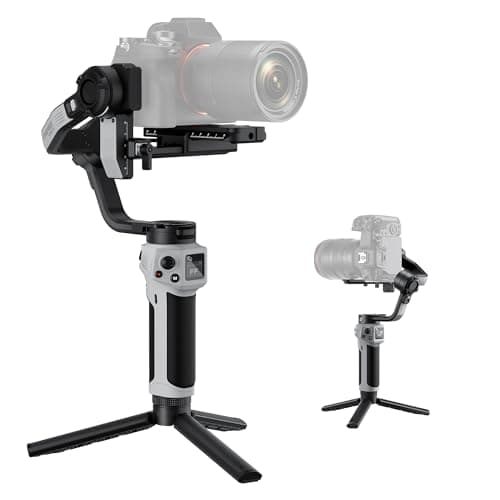
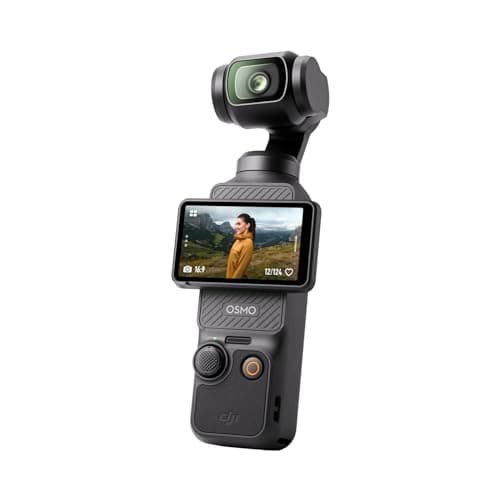
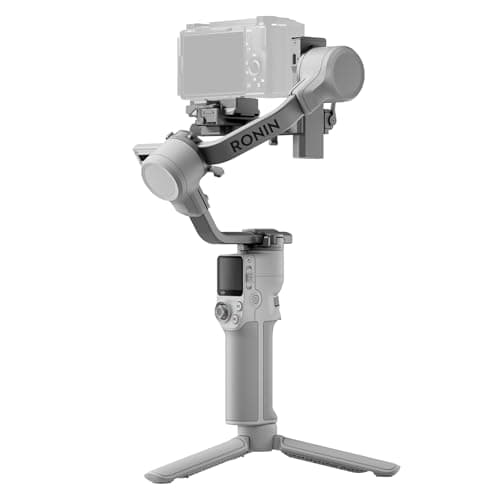
If you have read this far and can name the moving shot you are missing, here are the three we would point a first-time buyer toward: the gimbal most creators should start with, the budget pick that carries more for less, and the camera that has a gimbal built in.
Try these before you buy a gimbal
A gimbal is the last layer, not the first. These cost little or nothing and fix more footage than most people expect.
- Walk differently. Bent knees and even, deliberate heel-to-toe steps reduce the bounce, with or without a gimbal. Practice it before you spend anything.
- Put the camera on legs. For anything where the camera does not need to move, a tripod beats every stabilizer on this page. Our best tripods guide covers the options, and a monopod is a lighter middle ground for events.
- Use what your camera already does. Turn on in-body or electronic stabilization for walking shots and accept the crop, or record gyro data and stabilize the clips that need it in editing.
- Shoot shorter moving clips. A three-second handheld cutaway hides shake that a thirty-second walk exposes. Plan the long moving take only when the story needs it.
When a gimbal is overkill
If you film sitting down, a gimbal is money you will not get back; a tripod and good light will do more for a desk channel, and our guide to filming yourselfcovers that setup from framing to sound. If you mainly take photographs, a gimbal adds nothing to a still image. If your videos are made of short clips and your camera has in-body stabilization, you are probably covered. And if you cannot describe the specific moving shot you are missing, "smoother video" is usually a tripod, a better lens or a steadier walk, not a new piece of kit.
The learning curve, honestly
A gimbal is not plug-and-play. You balance the camera before every session, choose a follow mode, learn the joystick, and learn to walk in a way that feels ridiculous for the first week. Holding roughly a kilogram out in front of you for a long take is tiring too, which is why two-handed grips and sling-style handles exist. None of that is hard, but budget a few practice sessions before a shoot that matters. Do not judge the gimbal on your first afternoon with it; judge it after a week.
Why these three
The DJI RS 4 Mini is our first choice because it removes the two excuses that send gimbals to the back of a cupboard: weight and setup time. At about 890g with automatic axis locks, it is the one most people keep using, provided their camera and lens sit comfortably inside its 2kg payload. Our full RS 4 Mini review covers its catches.
The Zhiyun Weebill 3Eis the budget pick. When we checked, it was the cheapest of the three picks here by a clear margin, and its rated payload is higher than the Mini's, which matters if your rig includes a heavier zoom. Digital Camera World concluded it "will do the job nicely" for smooth pans, tilts, tracking and crane moves. It is also the hedge against DJI's uneven US availability, the reason we pair every DJI gimbal with an alternative; our Zhiyun vs DJI comparison puts the two side by side.
The DJI Osmo Pocket 3 is the alternative to buying a gimbal at all: a 179g camera with a 1-inch sensor and a mechanical 3-axis gimbal built in. It records 4K at up to 120fps through a fixed 20mm-equivalent f/2.0 lens. It is still a 3-axis gimbal, so the walking technique above still applies, and the fixed lens means no portrait framing and no lens swaps. For creators who mostly walk and talk, though, it replaces a camera, a lens and a gimbal with one pocketable thing. Our Osmo Pocket 3 review covers where it falls short.
For the full field, including heavier-duty options, see our best gimbals for mirrorless cameras and best budget gimbals rankings.